Your site can show a feed of your recent Instagram posts on the home page, and publish walk photo albums to Instagram as a carousel.
Both rely on the Facebook Page connection described in Configuring Social Media. Connect that first — this page only covers what is specific to Instagram.
You no longer need a separate Instagram access token, and there is no command-line work involved.
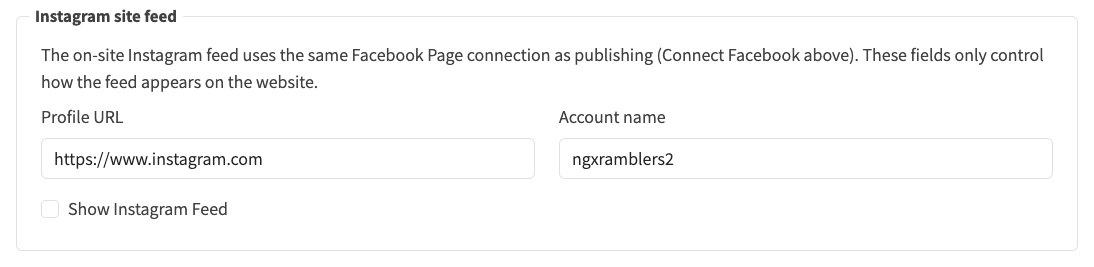
On the Social Media sub-tab, find the Instagram site feed panel. These fields only control how the feed is presented; the posts themselves come from the Facebook Page connection.
Click Save.
The Instagram site feed panel controls presentation only. The posts come from the Facebook Page connection.
The home page shows a panel with your Instagram icon, account name, follower and post counts, and a Visit button opening your profile in a new tab.
Below that sit your nine most recent posts as square thumbnails. Hovering enlarges a photo slightly and shows its date and caption; clicking opens that post on Instagram. Videos and multi-photo carousels show a still image rather than a gap. While posts load, placeholder tiles keep the panel's shape.
With Publish walk albums to Instagram switched on, content admins can publish an album straight from the website. On an album where an editor has enabled Allow Share To Social Media, open Share, choose Instagram, select photos, write or generate a caption, then publish. Progress is shown as it goes, because Instagram takes a minute or two to process each image.
Instagram's own rules apply, and the panel checks them before you publish:
| Rule | Detail |
|---|---|
| Carousel size | Between 2 and 10 images |
| Aspect ratio | Between 4:5 and 1.91:1 |
| Posting limit | Roughly 25 published posts per 24 hours |
The site records each successful post, so the same album cannot be published twice to Instagram by accident.
| What you see | Likely cause |
|---|---|
| Nothing on the home page | Show Instagram Feed is off |
| "No Instagram posts yet" | The Page is not connected, or the account has no public posts |
| "Instagram feed unavailable" | Meta could not be reached, or the token needs renewing |
| Feed works but publishing fails | Publish walk albums to Instagram is off, or the account is personal rather than Business or Creator |
Earlier versions of this page described the Instagram Basic Display API: creating a Consumer app, inviting Instagram test users, and exchanging short-lived tokens for long-lived ones on the command line. Meta has retired that API and the website no longer uses it. If you followed those steps before, nothing needs undoing — just connect your Facebook Page as described in Configuring Social Media.