# External Email → Apple Mail on a Mac
On [Profile → External Email](https://ngx-ramblers.org.uk/admin/profile/external-email-setup "{{siteUrl}}"), choose Mac then Apple Mail on Mac. The steps on the page match Mail → Add Account → Other Mail Account.
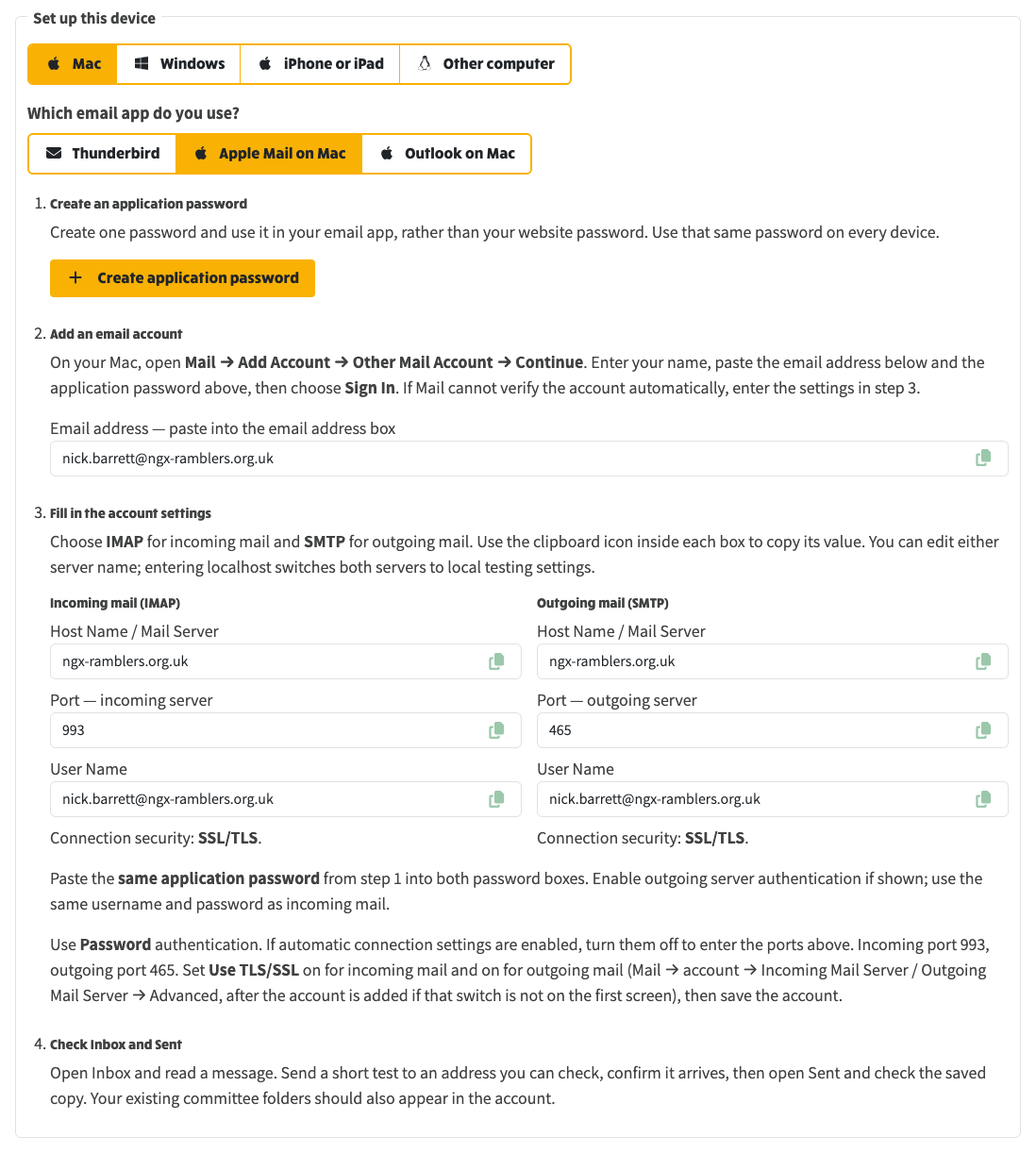
*Apple Mail on Mac: create one application password, add the account in Mail, then paste IMAP 993 and SMTP 465 with SSL/TLS.*
> **Related**
>
> [External Email](https://ngx-ramblers.org.uk/how-to/committee/email-articles/external-email)
>
> [30 October 2026 release note](https://ngx-ramblers.org.uk/how-to/committee/release-notes/2026-10-30-issue-407)
>
> [Committee role mailboxes and inbox notifications](https://ngx-ramblers.org.uk/how-to/committee/email-articles/committee-role-inbox)
>
> [Admin → Inbox](https://ngx-ramblers.org.uk/admin/inbox "{{siteUrl}}")