{"id":"665adf6e549710001a6ad644","title":"Built In Process Mappings","path":"how-to/committee/email-articles/mail-settings/built-in-process-mappings","contentMarkdown":"# Built-in Processes Tab\n- [NGX-Ramblers]() has some built-in processes that automatically use email at points in the workflow as follows:\n - **Contact Us**: When a visitor fills in the Contact Us form on the website, their enquiry is automatically emailed to the relevant committee role.\n - **Forgot Password Process**: The Website automatically sends an email to a member that has requested a password reset from the [Forgot Password](https://ngx-ramblers.org.uk/forgot-password) link on the website header.\n - **Walk Changes**: The Website automatically sends an email to a member, or the Walks Coordinator when changes have been made on a walk they are leading. Note that this only applies to groups that have configured the **Walk Population Method** to be **Local**, configured from [System Settings](https://ngx-ramblers.org.uk/admin/settings/system-settings \"{{siteUrl}}\") (found at [`/admin/settings/system-settings`](https://ngx-ramblers.org.uk/admin/settings/system-settings \"{{siteUrl}}\")).\n - **Expense Claims**: The Website automatically sends an email to a member, or members of the Committee in relation to the change in status of an expense claim they have raised.\n - **Booking Notifications**: When someone books a place on an event - or cancels, is waitlisted, has a place restored, or is sent a reminder - the Website automatically sends the matching booking email to the attendee. The wording is set under the **Booking Notification** email configuration and can be tailored per event; see [Customising Email Wording](https://ngx-ramblers.org.uk/how-to/committee/email-articles/customising-email-wording).\n- The Built-in Processes tab allows each of the above described processes to be linked to an Email Notification configuration.\n- On your website this page can be found at [your website/admin/mail-settings?tab=built-in-processes](https://ngx-ramblers.org.uk/admin/mail-settings?tab=built-in-processes \"{{siteUrl}}\"). A screenshot is shown below:\n\n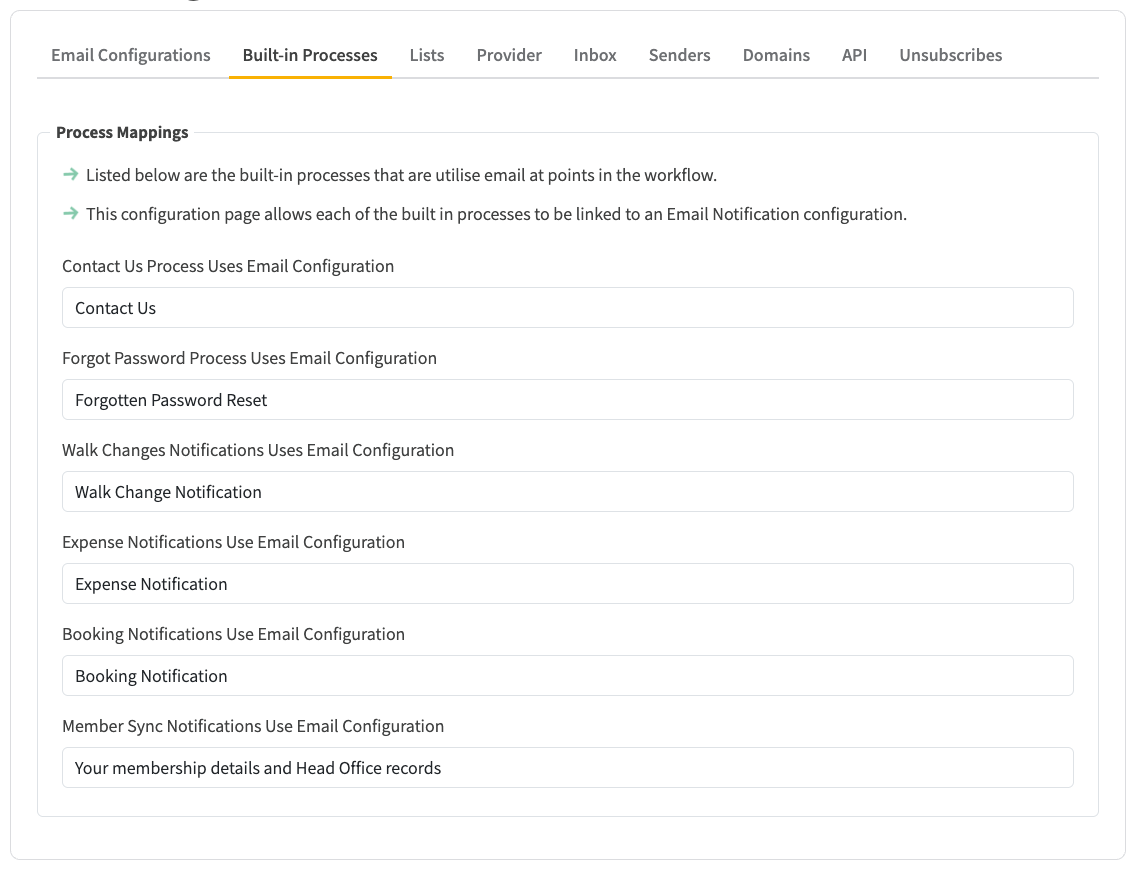\n\n* If an email configuration is associated with any of the built-in processes, the email configuration will not apper in the **Email Type** dropdown displayed when sending an email. This is because the built-in process auto-generates email content that cannnot be accessed by the send emails screens. The **Member Selection and Actions** section will not contain any inputable fields and will look like this:\n\n","contentHtml":"Built-in Processes Tab
\n\n- NGX-Ramblers has some built-in processes that automatically use email at points in the workflow as follows:
\n- Contact Us: When a visitor fills in the Contact Us form on the website, their enquiry is automatically emailed to the relevant committee role.
\n- Forgot Password Process: The Website automatically sends an email to a member that has requested a password reset from the Forgot Password link on the website header.
\n- Walk Changes: The Website automatically sends an email to a member, or the Walks Coordinator when changes have been made on a walk they are leading. Note that this only applies to groups that have configured the Walk Population Method to be Local, configured from System Settings (found at
/admin/settings/system-settings). \n- Expense Claims: The Website automatically sends an email to a member, or members of the Committee in relation to the change in status of an expense claim they have raised.
\n- Booking Notifications: When someone books a place on an event - or cancels, is waitlisted, has a place restored, or is sent a reminder - the Website automatically sends the matching booking email to the attendee. The wording is set under the Booking Notification email configuration and can be tailored per event; see Customising Email Wording.
\n
\n \n- The Built-in Processes tab allows each of the above described processes to be linked to an Email Notification configuration.
\n- On your website this page can be found at your website/admin/mail-settings?tab=built-in-processes. A screenshot is shown below:
\n
\n
\n\n- If an email configuration is associated with any of the built-in processes, the email configuration will not apper in the Email Type dropdown displayed when sending an email. This is because the built-in process auto-generates email content that cannnot be accessed by the send emails screens. The Member Selection and Actions section will not contain any inputable fields and will look like this:
\n
\n
\n"}