
Email Configurations control the whole email: subject, banner, sender, recipients and wording. Event templates control each walk or social-event item inside that email, including its image, and the same format is used in printed programmes.
Open Admin → Mail Settings → Event Templates.
Admin → Mail Settings → Event Templates, next to Email Configurations.
The Existing format list is every saved event format on the site. Pick one to load it. Format name is the label the email composer shows.
The built-in listings (for example a three-column programme listing) are a starting point. Groups usually keep one or two formats that match how they like walks to look in a newsletter.
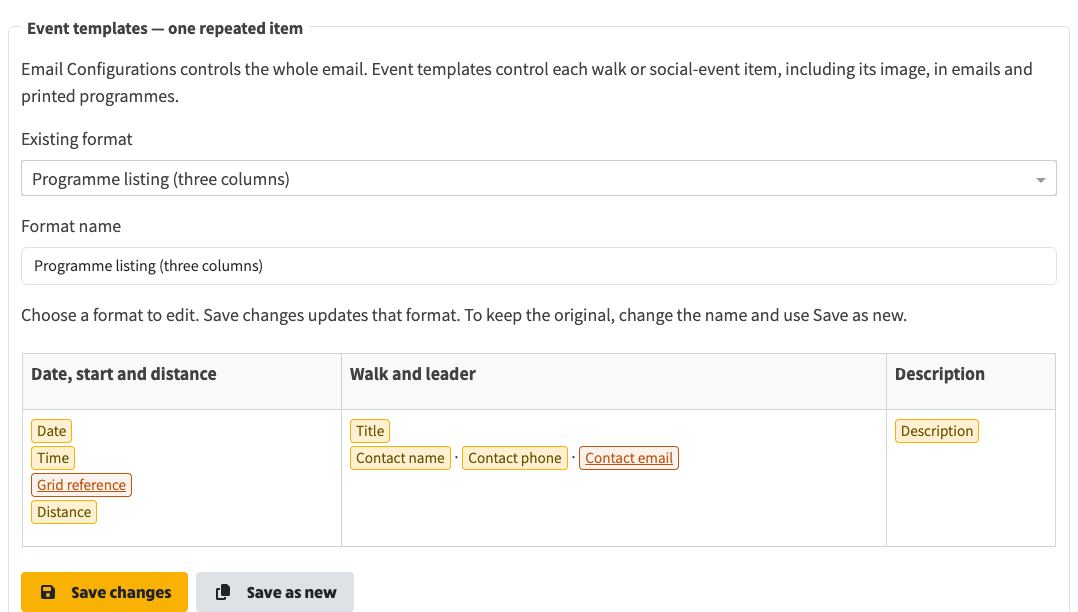
Choose a format, edit the repeating item, then Save changes or Save as new. Merge-field chips stand in for title, date, contact and other event fields.
The editor is one walk or social, not the whole email. Insert merge fields from the editor toolbar (title, date, time, distance, grade, location, grid reference, contact, description, image, and the event page link). Those tokens are filled from the real event when the email or PDF is built.
Coloured chips in the editor are merge fields. Linked fields (grid reference, contact email, event page) render as links. The image field inserts the event photo at the height set in the editor.
Below the editor is a live preview that uses real events from the site. Choose event types and a few events, optionally include images, then switch Email or PDF. Editing the markdown updates the preview immediately. The events themselves are not changed.
You need at least one event selected to see a listing. The preview is the repeating block only, not a complete newsletter.

Live preview uses real site events. Pick types and events below this heading, then Email or PDF.
When you write an email, the Events step has Event format. Built-in listings are listed first. Saved event template uses a format from this page. Manage event templates opens Admin → Mail Settings → Event Templates in a new tab.
Save the email draft to keep the format you chose. Preview & Review has Email and PDF views of the finished message.
Related