{"id":"665637e3687e5900196c6837","title":"2024 05 28","path":"how-to/committee/release-notes/2024-05-28","contentMarkdown":"# 28th May 2024 - [v91-96](https://github.com/nbarrett/ngx-ramblers/compare/6cd15190..bdf04ad9) - Brevo Campaign Mail Roll-out Part 4 \n### Migrated Campaign Email from Mailchimp to Brevo \n* This is the final phase of of the email migration which enables Campaign as well as transactional email to be handled by Brevo.\n* In this release, the functionality to configure any number of mailing lists was delivered, along with the abilty to subscribe members to mailing lists and for these subscriptions to be automatically sent to Brevo.\n* As was already in place for Mailchimp integration, a mail list synchronisation function now exists in [Member Admin](https://ngx-ramblers.org.uk/admin/members/member-admin \"{{siteUrl}}\") to allow the mailing lists to be kept in sync with data in Brevo in order to take account of new member subscriptions and unsubscriptions.\n* Additionally, the ability to send emails in bulk to any mailing list from the [Committee](https://ngx-ramblers.org.uk/committee/send-notification) & [Social](https://ngx-ramblers.org.uk/social) page was delivered.\n* As part of the release, [all aspects of email from configuration to sending have been documented fully in the How To section](https://ngx-ramblers.org.uk/how-to/committee/email-articles).\n* Email configurations found on the [Mail Settings page](https://ngx-ramblers.org.uk/admin/mail-settings?tab=email-configurations \"{{siteUrl}}\"), drive individual email workflows and are and highly customisable in order to accommodate the needs of each group. \n* Several enhancements have been made in this release which are explained in the following section, broken down by different tabs on the [Mail Settings page](https://ngx-ramblers.org.uk/admin/mail-settings?tab=email-configurations \"{{siteUrl}}\"):\n- An example screenshot is provided below:\n\n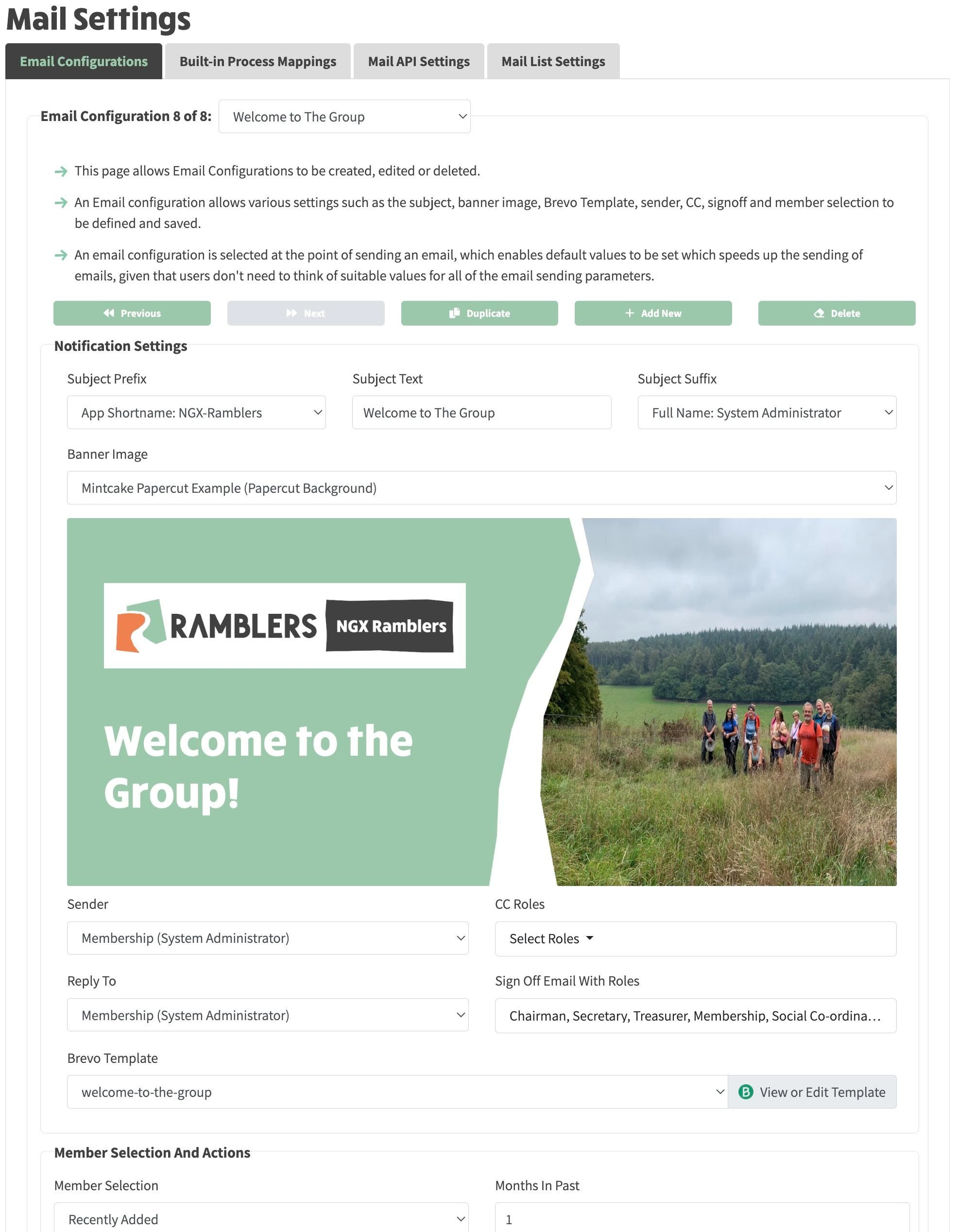\n\n- Mail List settings tab now allows creation of any number of mailing lists. Rename or delete options also available.\n- All prior hard-coding to General, Walks or Social Event list names (as per mailchimp design) removed.\n- Auto Subscription to mailing list now configured on a per-list basis rather than globally.\n\n#### Email Configurations Tab\n* On your website this page can be found at [your website/admin/mail-settings?tab=email-configurations](https://ngx-ramblers.org.uk/admin/mail-settings?tab=email-configurations \"{{siteUrl}}\").\n\n#### Mail Settings > Built-in Process Mappings\n* On your website this page can be found at [your website/admin/mail-settings?tab=built-in-process-mappings](https://ngx-ramblers.org.uk/admin/mail-settings?tab=built-in-processes \"{{siteUrl}}\").\n\n#### Email Sending\n##### Campaign email\n- Mail settings Notification config editor allows default list to be specified when Member Selection is Mailing list.\n- Committee and Social Events mail send migrated from Mailchimp to Brevo. These allow to send to any defined list but default to the default list specified in the Notification config.\n- Missing sender now detected automatically with option to create new sender automatically in Brevo.\n- Campaign Send disabled until Sender created.\n\n##### Transactional email\n- Support for CC to any number of committee roles in Notification config.\n- Send Emails functionality now has more sophisiticated pre or post-workflow action.\n\n#### Member Admin\n- Brevo Mail list changes either via API or manually from members or member administrators are now audited and viewable on Brevo Tab for the Member.\n- Implemented List and contact synchronisation via MailListUpdaterService and all server endpoints.\n\n#### Miscellaneous Changes\n- DataPopulationService created which now contains defaultPageContentForAdminActionButtons() formerly in Admin component. But also has generateDefaultContentTextItems(), which creates any missing content text items needed for new / changed components.\n- Committee Year page enhanced to allow more flexible layout (e.g. Committee Actions can be placed above Committee Years)\n- Documentation on Bulk Load process updated - links to latest Explore/Membership/Membership Secretaries V4/FullList from InsightHub added.\n- Fix to Album gallery problem not setting image size to cover. Discussed and resolved in https://github.com/MurhafSousli/ngx-gallery/issues/610.\n\n#### Admin System Settings \n* On your website this page can be found at [your website/admin/system-settings](https://ngx-ramblers.org.uk/admin/settings/system-settings \"{{siteUrl}}\"), on the **External Systems** tab.\n* Added Mail Provider switch to toggle mail functionality between None, Mailchimp and Brevo.\n* Mail bulk subscribe/ Unsubscribe functionality added. This is used when mail is first setup for the website and existing members have already been loaded but have no subscriptions.","contentHtml":"28th May 2024 - v91-96 - Brevo Campaign Mail Roll-out Part 4
\nMigrated Campaign Email from Mailchimp to Brevo
\n\n- This is the final phase of of the email migration which enables Campaign as well as transactional email to be handled by Brevo.
\n- In this release, the functionality to configure any number of mailing lists was delivered, along with the abilty to subscribe members to mailing lists and for these subscriptions to be automatically sent to Brevo.
\n- As was already in place for Mailchimp integration, a mail list synchronisation function now exists in Member Admin to allow the mailing lists to be kept in sync with data in Brevo in order to take account of new member subscriptions and unsubscriptions.
\n- Additionally, the ability to send emails in bulk to any mailing list from the Committee & Social page was delivered.
\n- As part of the release, all aspects of email from configuration to sending have been documented fully in the How To section.
\n- Email configurations found on the Mail Settings page, drive individual email workflows and are and highly customisable in order to accommodate the needs of each group.
\n- Several enhancements have been made in this release which are explained in the following section, broken down by different tabs on the Mail Settings page:
\n
\n\n- An example screenshot is provided below:
\n
\n
\n\n- Mail List settings tab now allows creation of any number of mailing lists. Rename or delete options also available.
\n- All prior hard-coding to General, Walks or Social Event list names (as per mailchimp design) removed.
\n- Auto Subscription to mailing list now configured on a per-list basis rather than globally.
\n
\nEmail Configurations Tab
\n\nMail Settings > Built-in Process Mappings
\n\nEmail Sending
\nCampaign email
\n\n- Mail settings Notification config editor allows default list to be specified when Member Selection is Mailing list.
\n- Committee and Social Events mail send migrated from Mailchimp to Brevo. These allow to send to any defined list but default to the default list specified in the Notification config.
\n- Missing sender now detected automatically with option to create new sender automatically in Brevo.
\n- Campaign Send disabled until Sender created.
\n
\nTransactional email
\n\n- Support for CC to any number of committee roles in Notification config.
\n- Send Emails functionality now has more sophisiticated pre or post-workflow action.
\n
\nMember Admin
\n\n- Brevo Mail list changes either via API or manually from members or member administrators are now audited and viewable on Brevo Tab for the Member.
\n- Implemented List and contact synchronisation via MailListUpdaterService and all server endpoints.
\n
\nMiscellaneous Changes
\n\n- DataPopulationService created which now contains defaultPageContentForAdminActionButtons() formerly in Admin component. But also has generateDefaultContentTextItems(), which creates any missing content text items needed for new / changed components.
\n- Committee Year page enhanced to allow more flexible layout (e.g. Committee Actions can be placed above Committee Years)
\n- Documentation on Bulk Load process updated - links to latest Explore/Membership/Membership Secretaries V4/FullList from InsightHub added.
\n- Fix to Album gallery problem not setting image size to cover. Discussed and resolved in https://github.com/MurhafSousli/ngx-gallery/issues/610.
\n
\nAdmin System Settings
\n\n- On your website this page can be found at your website/admin/system-settings, on the External Systems tab.
\n- Added Mail Provider switch to toggle mail functionality between None, Mailchimp and Brevo.
\n- Mail bulk subscribe/ Unsubscribe functionality added. This is used when mail is first setup for the website and existing members have already been loaded but have no subscriptions.
\n
\n"}