11-Jun-2026 — write committee documents on the website, themed to your group (#281)
committee: compose themed committee documents in TipTap as an alternative to file attachments (#281)
Committee documents can now be written directly on the website in a
rich-text editor and rendered through a group-themed template, instead
of being styled by hand in Word, exported to PDF and uploaded. Uploads
keep working unchanged; this is an additional option, not a
replacement. Delivers all four requirements of
#281, and works
for any group out of the box because every themed element is driven
from the group's existing configuration.
In plain English
- Until now, every committee document (meeting notes, agendas, AGM minutes) had to be written in Word, styled by hand with the group logo, header and charity footer, exported to PDF and uploaded to the website. The styling was redone from scratch on every document, the result was a static file that could never be re-styled, and readers always had to download or open a PDF.
- Committee members can now choose Compose document instead of uploading. The document is written in the same easy rich-text editor used by the email composer, headings, lists, links, tables and pictures, with no HTML and no Word needed, and saved straight into the website.
- The professional look is applied automatically by a template that is defined once and styled from each group's own settings, so the author only ever writes the content. The template reproduces the look groups currently produce by hand in Word: the official Ramblers paper-cut sweep across the full width of the page top (the exact shape lifted from the existing branded documents, recoloured as a transparent asset) with the group's logo on white beneath its shallow side, never overlapping the cut and scaling with the band so it sits correctly at every page size, a yellow swash bar running under the title and every section heading and extending just past the text, links in the same colour as rendered emails, and a footer with the group's contact details, the Ramblers charity registration small print and the Fundraising Regulator badge in its registered colours. The templateId field on each document leaves room for alternative paper-cut designs later. When a converted document carries its own title heading, the template uses that rather than repeating the stored title above it.
- Composed documents open in the browser presented exactly like a PDF: discrete A4 pages on a dark viewer backdrop, each page carrying the group header band at the top and the group footer at its foot, with content flowing across pages paragraph by paragraph. The very same document prints to a clean A4 layout with one click, with the band and footer repeating on every printed page just as they do in the hand-made PDFs.
- Existing uploaded Word and PDF documents can be converted into editable composed documents with one click. The converter fills the editor with the content, including structure such as bold, headings, links, images and tables, automatically removes the logo, contact line and charity small print (the template adds those back itself), and never touches the original uploaded file.
- If a group's logo or branding changes in future, every composed document automatically picks up the new look the next time it is viewed, because the styling lives in the template rather than being baked into each document.
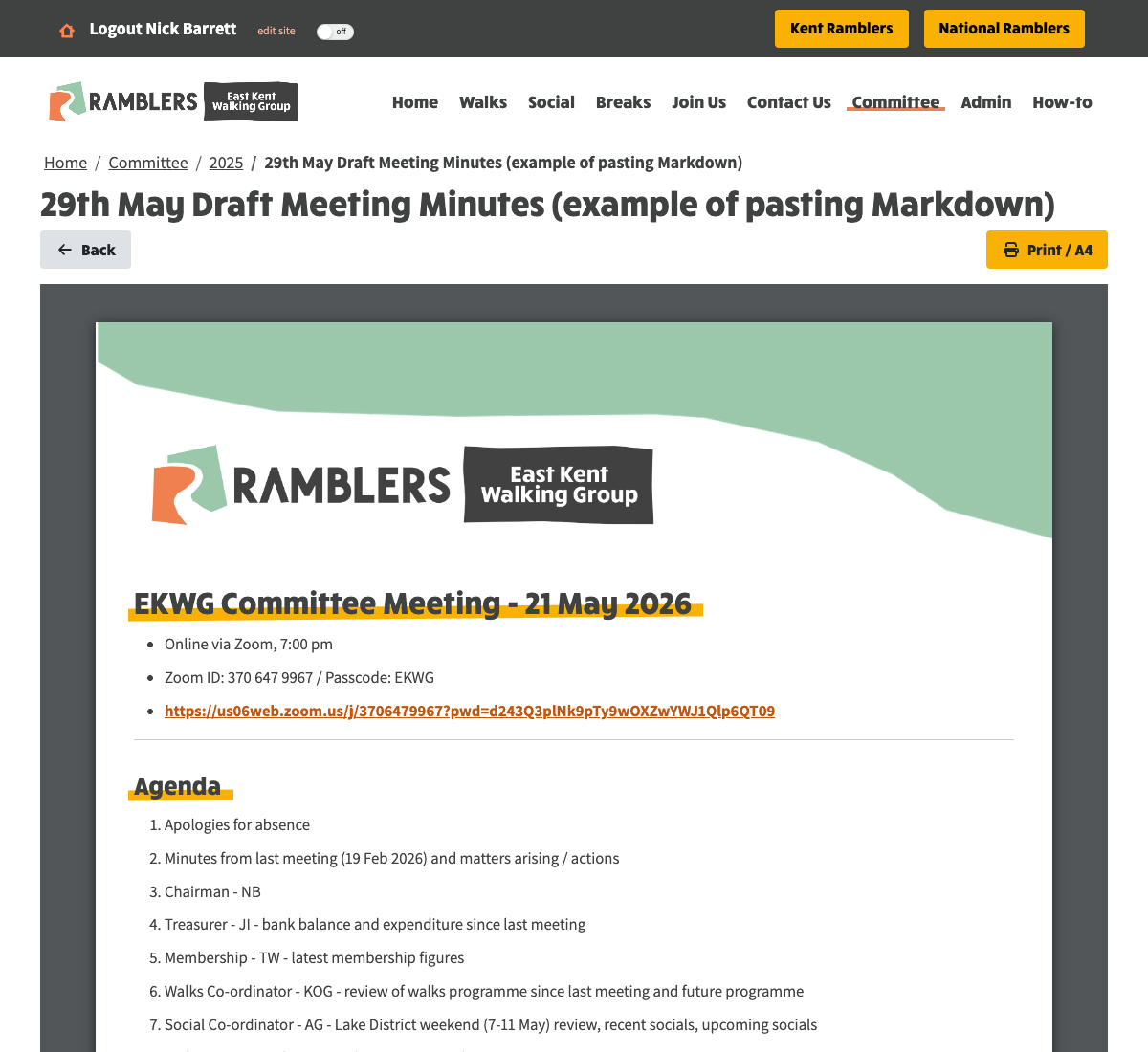
A composed document as readers see it: discrete A4 pages on a viewer backdrop, the group paper-cut band and logo, yellow-highlighted headings, a breadcrumb that leads straight back to the source page, and Back and Print / A4 buttons.
Why this was needed
The write in Word, style by hand, export to PDF, upload round trip
baked the official look into every file at the moment it was exported.
Nothing could be re-themed later, there was no online-friendly version,
and the most error-prone part, reproducing the logo, header and
charity footer correctly, was repeated manually for every document.
The ticket asked for the styling to be defined once per group, with the
author writing only the content, and for two render modes (web and A4
print) from the same stored text.
How to compose a document
- Go to a committee documents page (for example AGM or Committee Meetings) while signed in with file admin access, and click Add File as usual.
- At the top of the editor, choose Compose document instead of Upload attachment, the same sunrise-outlined section toggle used across System Settings. The date and file type fields work exactly as before.
- Type a Document Title, then write the content in the editor below it. The editing area is styled with the document theme as you type, headings show their yellow highlight immediately, so what you see while writing matches the finished document. The toolbar stays pinned to the top of the window while scrolling long documents, and every toolbar control shows a styled tooltip on hover describing what it does.
- Click Preview at any time to see the document exactly as readers will see it, rendered through the group template, and Hide Preview to carry on editing.
- Merge fields, an email concern that would render as raw tokens in a document, are not offered in the compose editor, in the toolbar or in the link popup.
- Click Save File and the document appears in the documents list immediately, alongside uploaded files, with its own page-style icon, no page refresh needed, for uploads and conversions alike.
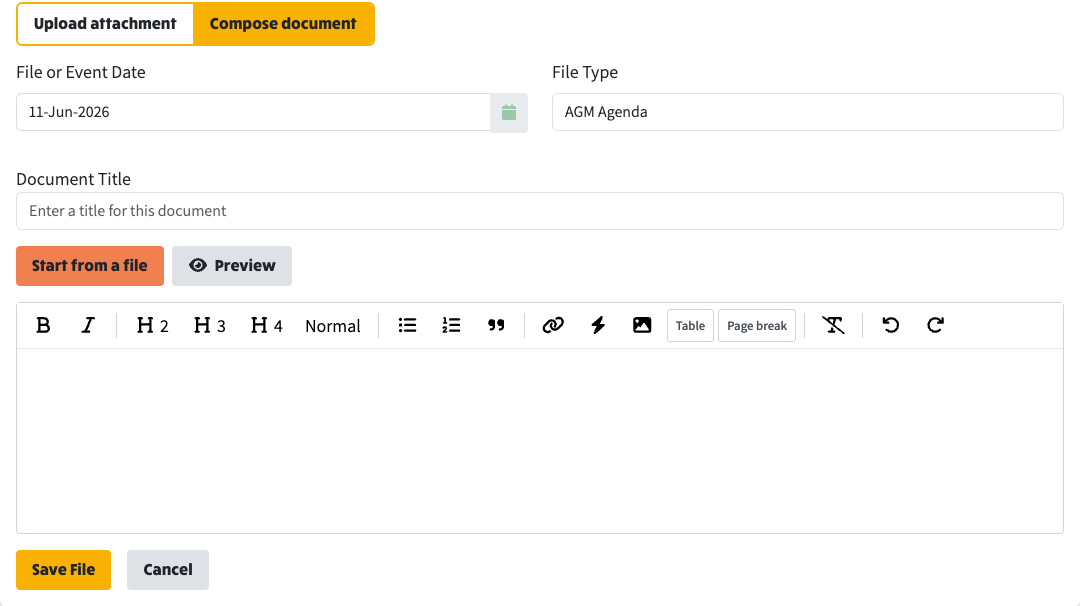
Choose Compose document instead of Upload attachment when adding a committee file. The date and file type fields work exactly as before, and the toolbar carries Table and Page break buttons.
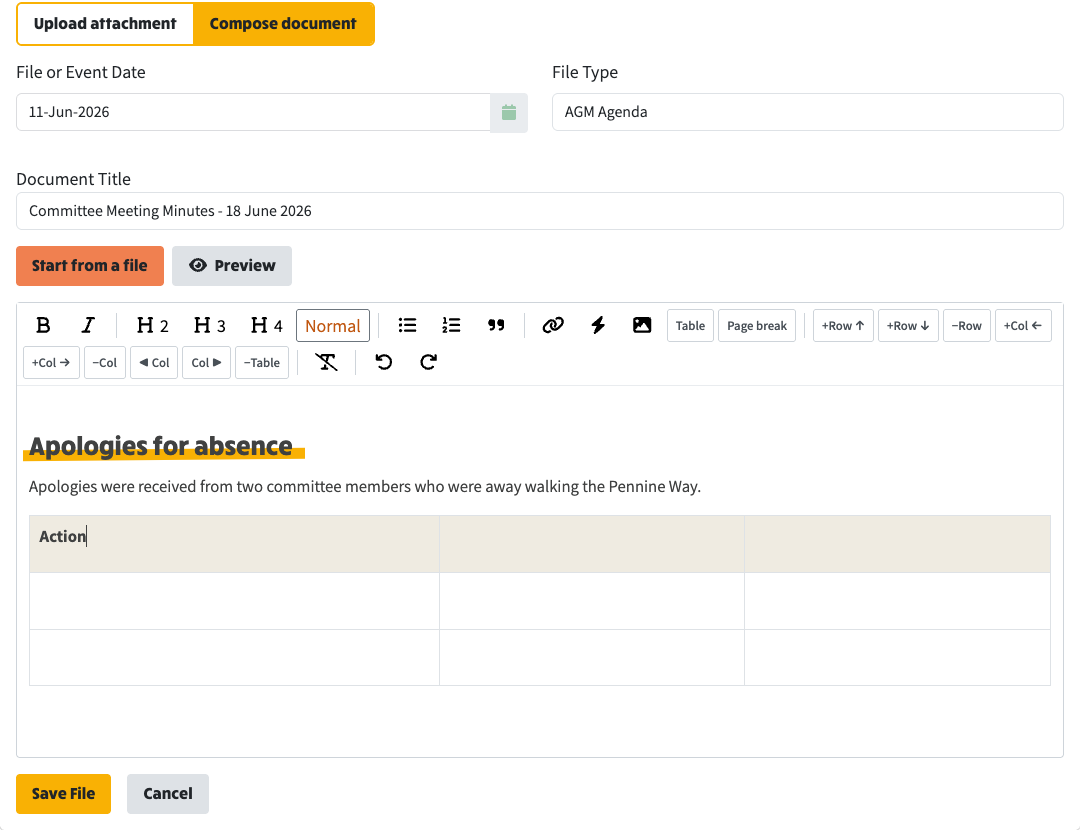
Writing a document: headings show their yellow highlight as you type, and with the cursor inside a table the toolbar grows row and column controls, including moving a whole column left or right.
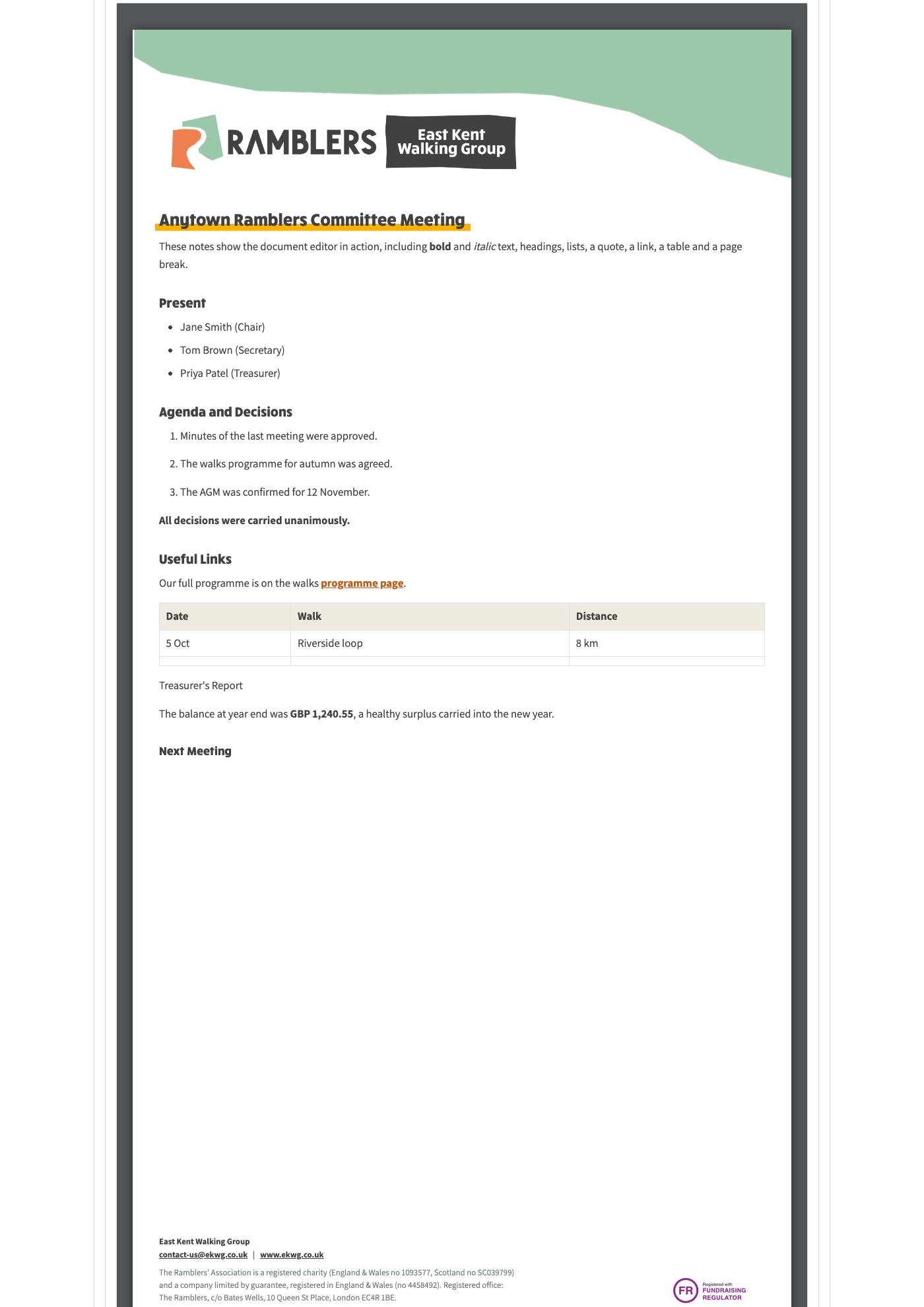
Preview shows the document exactly as readers will see it, rendered through the group template. This sample exercises the formatting available to authors - a highlighted title, bold and italic text, bulleted and numbered lists, a quote, a link, a table and a page break - with the group band, logo and charity footer applied automatically.
Working with tables
- A Table toolbar button inserts a table with a header row at the cursor.
- With the cursor anywhere inside a table, the toolbar grows a set of table controls: add a row above or below, delete the row, add a column to the left or right, delete the column, move the current column left or right, or delete the whole table, so converted programmes and schedules can be reshaped without leaving the editor.
- Rendered tables size their own columns: the view measures how much content each column carries and gives content-heavy columns (such as a Walk Description) an explicit share of the width, capped so the rest can breathe, while narrow columns size naturally to their content so postcodes, grid references, phone numbers and names wrap between words, never in the middle of one. The same widths apply on screen and in print.
Page breaks
- A Page break toolbar button inserts a page break at the cursor, shown in the editor as a dashed marker line that cannot be edited, only selected and deleted, exactly like Word's page break marker.
- It forces a page break at that point both on screen and in print. Typing PAGEBREAK on a line of its own does the same.
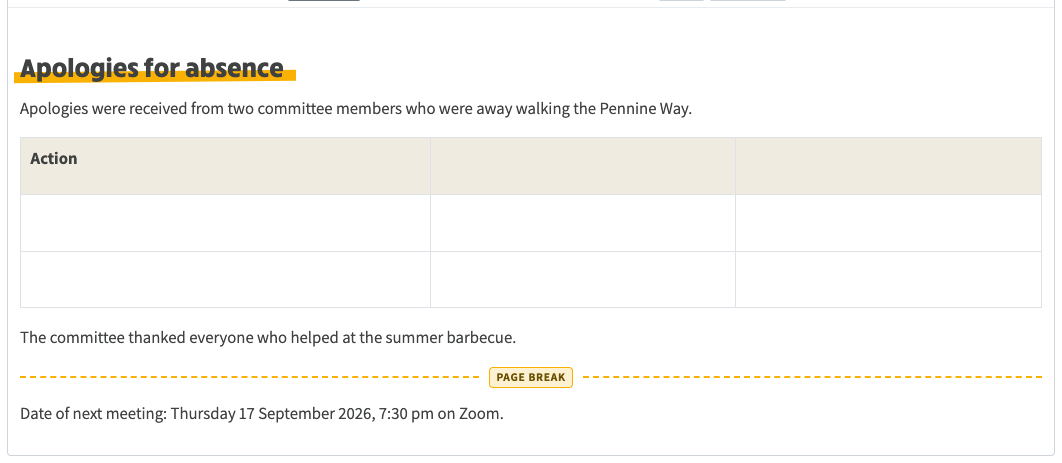
The page break appears in the editor as a dashed marker that cannot be edited - only selected and deleted, exactly like Word's page break.
How to convert an existing Word or PDF document
- On any uploaded Word (.docx) or PDF committee file, Convert to editable document appears both in the file's icon menu (alongside View in new tab and Download) and in the admin action buttons.
- Clicking it reads the uploaded file, converts the content to editable text and opens the compose editor pre-filled, with the title carried across. The original uploaded file is left exactly as it was, conversion creates a new document, so nothing is lost if the result is not wanted.
- Alternatively, when already composing, Start from a file lets a Word or PDF file be picked from the computer to pre-fill the editor the same way.
- Word documents convert with their structure largely intact: headings, bold, hyperlinks and tables all survive. A Word table becomes a real, editable table
- multi-paragraph cells are flattened onto one line, empty spacer rows are dropped, merged cells are unpicked so content stays in its proper column, and when Word's internal grid has split one visual column into two half-filled ones, they are recognised and healed back into a single column.
- PDF documents convert with their visual styling read from the file itself: bold text (including the bold lead-in sentences used in minutes) is kept bold, headings are recognised by their font size and become the yellow-highlighted section headings, wrapped sentences are rejoined into paragraphs, bullet characters become proper lists, repeated per-page headers and footers are removed, and multi-page documents convert in full.
- Images embedded in PDFs are extracted, stored in file storage and placed back into the document at their page positions. A logo image repeated on every page is recognised as template furniture and dropped, just like repeated text headers.
- Pages dominated by tables in a PDF, whose structure cannot be reliably rebuilt from extracted text, are captured whole as high-resolution page images so nothing is lost; they print and paginate like any other content. (Word tables do not need this; they convert to real tables.)
- The converter deliberately drops the boilerplate that the template re-adds: the embedded logo, the contact line and the charity registration footer. It also repairs the artifacts that real Word documents produce, stray empty bold marks, bold text split across lines, bold runs with stray spaces inside the markers that would otherwise show as literal asterisks, and agenda headings that arrive as bold paragraphs are promoted to proper section headings so they pick up the yellow highlight. Bold label lines such as Date, Location and Zoom Link are kept as labels.
- Light author tidying is still expected, especially for PDFs, the editor is the finishing tool.
- Old binary .doc files from pre-2007 Word are not supported; the editor asks for the file to be re-saved as .docx first.
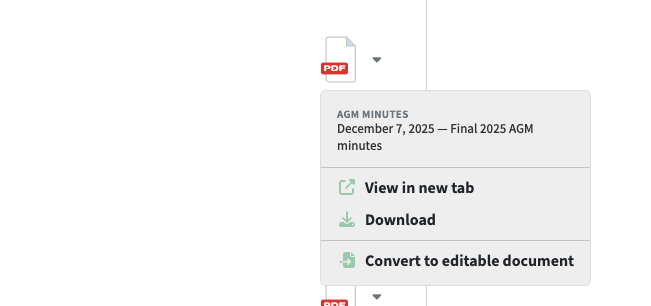
Convert to editable document appears on any uploaded Word or PDF committee file, alongside View in new tab and Download.
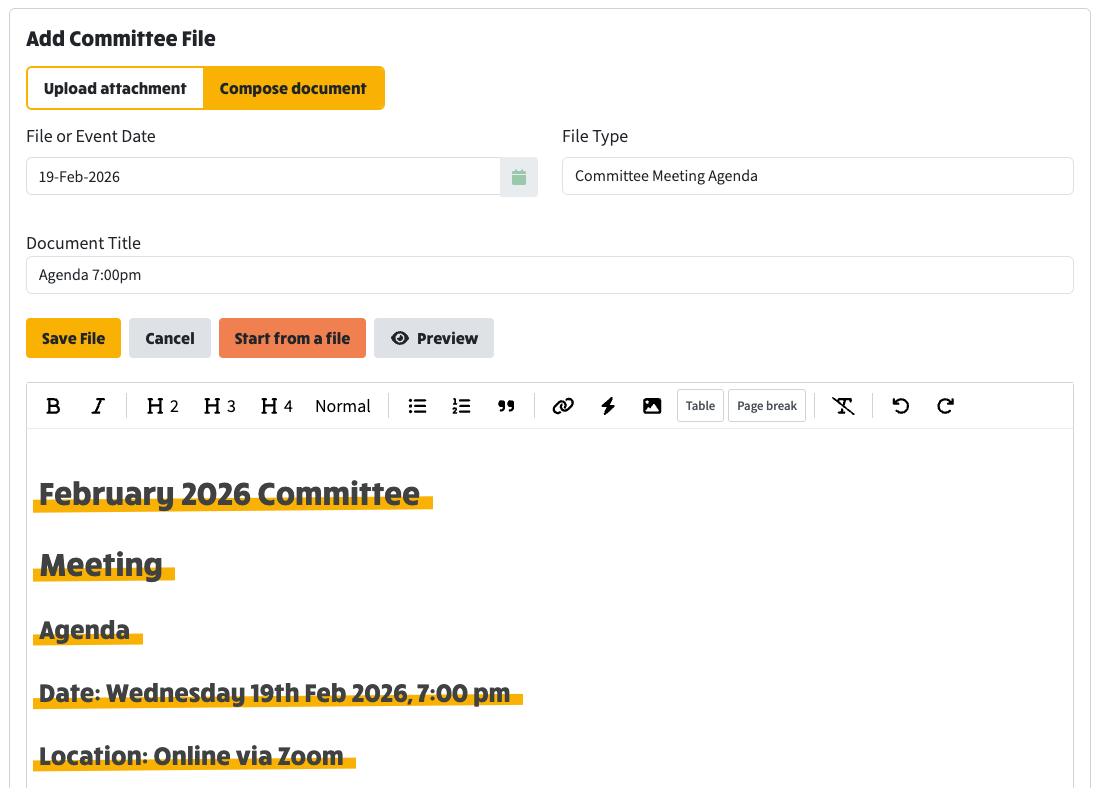
After clicking Convert to editable document, the compose editor opens pre-filled with the converted content - here a PDF agenda, its headings already highlighted, ready to edit and save as a composed document
Viewing, printing and emailing
- Every committee file opens at a human-readable address on its own page: the page path stays exactly as it is and a kebab-case query parameter names the file by its title and date, composed documents at committee/2025?document=final-meeting-notes-29th-may-25-august-28-2025 and uploaded files at committee/2025?file=(slug). No database identifiers appear anywhere, and the parameter name tells you which kind you are looking at.
- Because the path never changes, the breadcrumb is simply the real page trail (Home / Committee / 2025 / document title), and the Back button clears the parameter to reveal the page the file lives on, in place. When a documents row on a parent page lists files belonging to a child page (the auto-populate mode), addresses are built from the child page the files actually live on.
- Composed documents render through the themed template as paginated A4 sheets. Uploaded PDFs, images and Office files show embedded in the same page layout with a Download button, so readers never see raw storage links.
- Print / A4 appears in the file's icon menu and on the document page itself. It opens the browser's print dialogue with the page laid out for A4, the website's menus, breadcrumb and page title hidden, and the document's own header band and footer repeated on every page, so print-to-PDF gives a clean paginated document matching the old exported PDFs. Adding &print=true to a document link opens the print dialogue automatically.
- Send Email still works for composed documents: the email shows a View button that takes the reader to the document's web page, rather than attaching a file.
- Who can see a file follows the existing file type rules: public file types are visible to everyone, committee-only types need a committee sign-in.
- Uploaded files are completely unaffected: they keep their existing icons, View in new tab and Download actions.
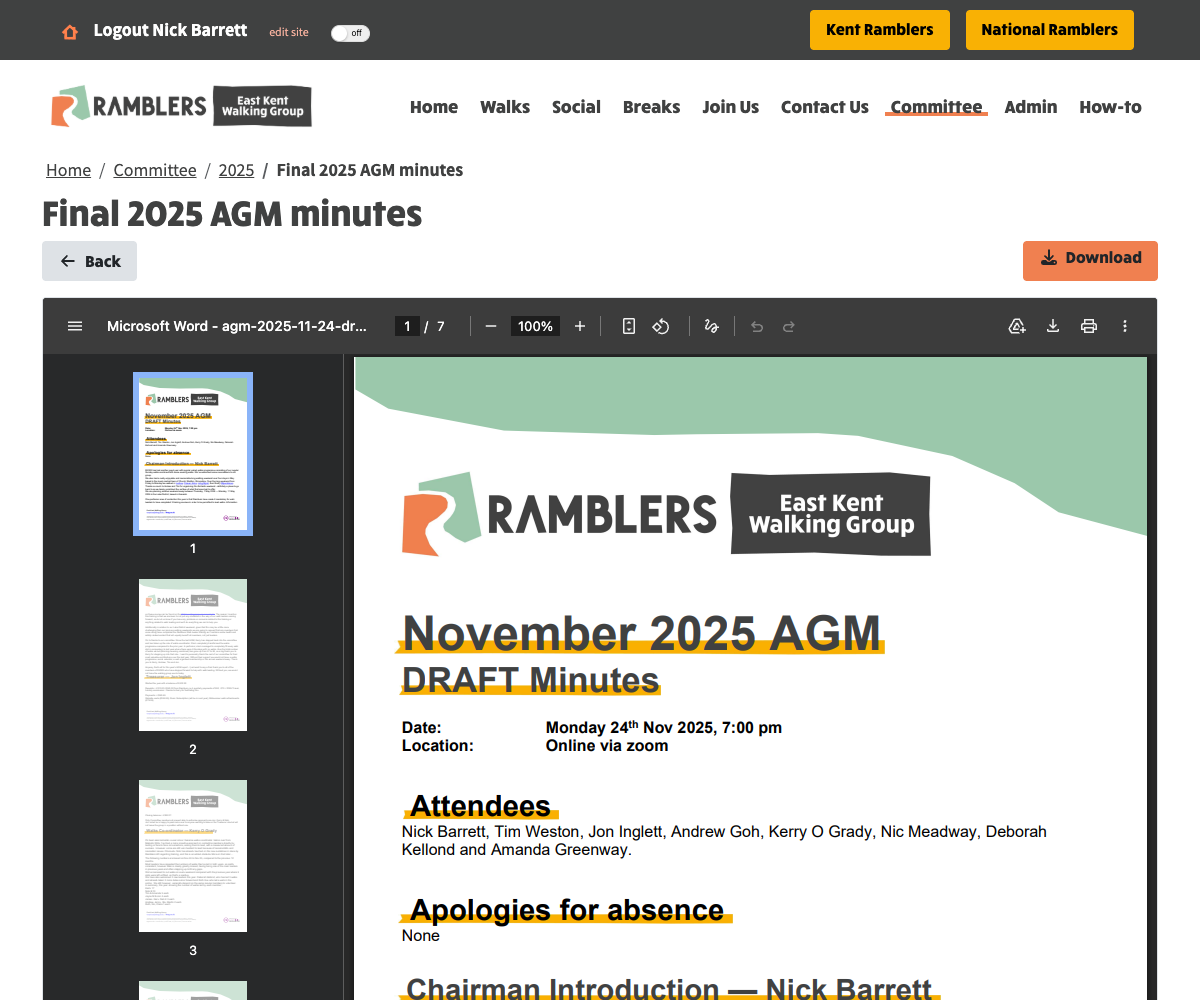
Uploaded files open embedded in the website at a readable address, with the breadcrumb and a Back button - readers never see raw storage links.
What the template uses, and how to change it
The template needs no configuration of its own, it is built entirely
from settings each group already has, so it works for every group with
nothing to set up:
- The logo comes from the header logo selected in System Settings.
- The group name and website address come from the group settings.
- The contact email comes from the committee role mapped to Contact Us in Committee Settings.
Changing any of those re-themes every composed document automatically.
The charity registration small print and Fundraising Regulator badge
are the national Ramblers wording that applies to every group, matching
the site footer. A templateId field is stored on each document so
further templates can be added later without reworking the data.
Technical changes
- CommitteeFile gains an optional document payload (title, markdown, templateId) in committee.model.ts and the Mongo schema; a file holds either fileNameData (upload) or document (composed), enforced at save time by the editor.
- committee-file-editor gains the kind switch, compose fields, live preview via the new themed view component, and the Start from a file import. The TipTap markdown editor is reused with merge fields off; its kind switch reuses the SectionToggle component (without URL sync, router navigation from inside dynamically routed CMS pages re-resolves the page and loses editor state).
- The TipTap editor gains a PageBreak atom node (markdown round trip to the PAGEBREAK marker, rendered as an uneditable dashed chip), an insert-table button, contextual table controls when the selection is inside a table (the move-column command rebuilds the table with the column repositioned in every row, safe because converted tables are always rectangular), and ngx-bootstrap tooltips on every toolbar control in place of native titles.
- New committee-document-view renders the markdown through ngx-markdown inside the themed shell, structured as a table whose header and footer rows repeat on each printed page; headings render as shrink-to-fit blocks so consecutive headings can never flow onto one line, and on screen the view is genuinely paginated: rendered blocks are measured and dealt onto A4-proportioned sheets (a block never splits mid-page; it moves to the next sheet), each sheet cloning the master header and footer, re-paginating on resize, config arrival and content change. A PAGEBREAK marker line becomes a forced sheet boundary on screen and a CSS page break in print, padded with blank lines in the rendered markdown so following content can never be absorbed into the marker's HTML block. Tables auto-fit their column widths at render time (content-heavy columns get an explicit capped share; the rest use the browser's automatic layout so unbreakable tokens are never split). The flow-table rendering is kept for print, where the browser's own pagination repeats the table header and footer groups; the backdrop, shadows, breadcrumb and page title disappear in print. The header logo is sized proportionally to the band (55% of its height) so it stays inside the paper-cut notch at both screen and print widths.
- committee-document-page serves both file kinds, activated by document/file query parameters detected inside the dynamic CMS page selector, resolving files by the same title-and-date kebab slug the email composer uses, with ordinal suffixes kept intact (29th, not 29-th; the parameter name disambiguates a PDF from its converted copy, which share a slug); attachments embed inline (PDF/images directly, Office files through the Office viewer's embed mode) with Back and Download actions.
- committee-display.service gains composed branches: isComposedDocument, composedDocumentUrl and composedDocumentPrintUrl, with fileUrl, viewUrl, canViewInBrowser, fileTitle, committeeFileSlug and iconFile all handling both kinds. The viewable/Office/convertible/icon extension groups are defined once in aws-object.model.ts and shared by all the display-service checks. A new icon-composed.svg matches the existing file icon set.
- The document theme lives in a global committee-document.sass stylesheet shared by the rendered page, the editor preview and the TipTap editing surface (via a mixin applied to the editor content), so all three always match, and the editor toolbar stays stuck to the top of the viewport while scrolling long documents (the editor shell uses overflow-x clip rather than hidden in compose mode, since an overflow scroll context would defeat position sticky). Print styling uses A4 page rules with print colour adjustment so the band and highlights survive printing, and a body-scoped rule hides the site chrome only while the document page is open.
- New POST /api/document-conversion/file (multipart upload) and POST /api/document-conversion/committee-file/:id (fetches the existing attachment from S3, trying both rootFolder-prefixed and bare keys to cope with differing stored shapes across environments, and downloading over HTTP when the stored name is a remote URL; failures report exactly which keys were tried) both return markdown plus a suggested title. Adds mammoth 1.12.0, pdf-parse 2.4.5 and turndown-plugin-gfm 1.0.2 to the server.
- Word converts via mammoth into the existing turndown service with the GFM tables plugin enabled, after a jsdom normalisation pass over mammoth's HTML: headerless tables gain a heading row, block content and line breaks inside cells are flattened inline, empty rows are removed, merged cells (colspan/rowspan) are expanded against the underlying grid so content stays in its proper column, all-empty grid columns are collapsed away, split columns are healed, when Word's grid boundaries jitter between rows the same logical column arrives as two half-populated ones, so adjacent columns whose content never overlaps on any row are merged back together, and every table is made rectangular against its header (overflow cell content merges into the last column rather than being lost).
- PDF uses a style-aware extraction built on the pdfjs engine inside pdf-parse: per-run font and size data reconstructs bold runs (the body font is the statistically dominant one; other fonts at body size are emphasis, needed because Word-exported PDFs embed anonymised font names with no bold flags) and font-size tiers drive title and section-heading detection, with superscript ordinals folded back into their surrounding run. Embedded images are extracted per page as PNGs via the same engine, deduplicated by content hash to discard per-page logo furniture, uploaded to S3 under committeeFiles/converted-images through an injected uploader (stubbed in tests) and substituted into the markdown at their page positions. Pages where a significant share of lines form three or more gap-separated columns are detected as table pages and rendered whole as page screenshots through the same image pipeline, since faithful table reconstruction from text geometry is not reliable (a future LLM-assisted pass is the upgrade path); the plain-text extraction remains as a fallback.
- The clean-up pipeline in markdown-post-processing.ts was validated against real multi-page committee documents and the worked example in the ticket, and each rule is unit tested: empty bold runs removed, bold rejoined across line breaks, edge spaces inside bold markers moved outside so the bold renders, mid-phrase bold fragments joined while adjacent bold headings separated only by a space are split onto their own lines (so back-to-back section headings such as an empty Chairman Highlights followed by Treasurer never merge into one), lone bold paragraphs promoted to headings, colon label lines preserved, data-URI images dropped, and logo, contact, page marker and charity boilerplate stripped, with markdown table rows (three or more pipes) exempt from the contact-line filter so schedule rows containing emails or websites are never dropped. PDF text additionally gets wrapped lines rejoined into paragraphs (including continuations of list items and capitalised continuations of long wrapped lines), unicode bullet glyphs normalised to markdown lists, short lines repeated across most pages (page-header furniture) removed, label lines such as Date / Location / Zoom Link emboldened, short section-and-owner lines (Treasurer — name) and well-known minutes section names (Attendees, Apologies for absence, Any Other Business...) promoted to highlighted headings, the leading title line promoted to the document heading, and a clear error for scanned PDFs with no text layer. Heading detection runs before paragraph joining so section names act as paragraph boundaries.
- The email composer labels composed documents View instead of Download and links them to the web view; the committee documents row offers the convert action on .docx and .pdf attachments only, in both the file icon menu and the admin action buttons.
Tests
Sixty-five server tests cover the conversion pipeline, including an
end-to-end Word conversion built from a real .docx in memory that
asserts embedded hyperlinks survive as markdown links (PDF text carries
no hyperlink data, so links there remain plain URLs), a Word table
conversion asserting header, separator and data rows with an email
address retained, and regression cases taken directly from converted
real-world agendas and minutes. The full server suite passes, with
frontend lint, TypeScript checks and standalone Sass compilation of the
new components' styles all clean.