16-Jun-2026 — junk mail, read/unread, recipient visibility & Contact Us routing #278
Extends the committee Email inbox with junk-mail triage, read/unread
control, clearer addressing, and fixes Contact Us so submissions to a role
backed by a connected inbox arrive at the role's own address. Part of the
Gmail inbox work in #278.
What's new
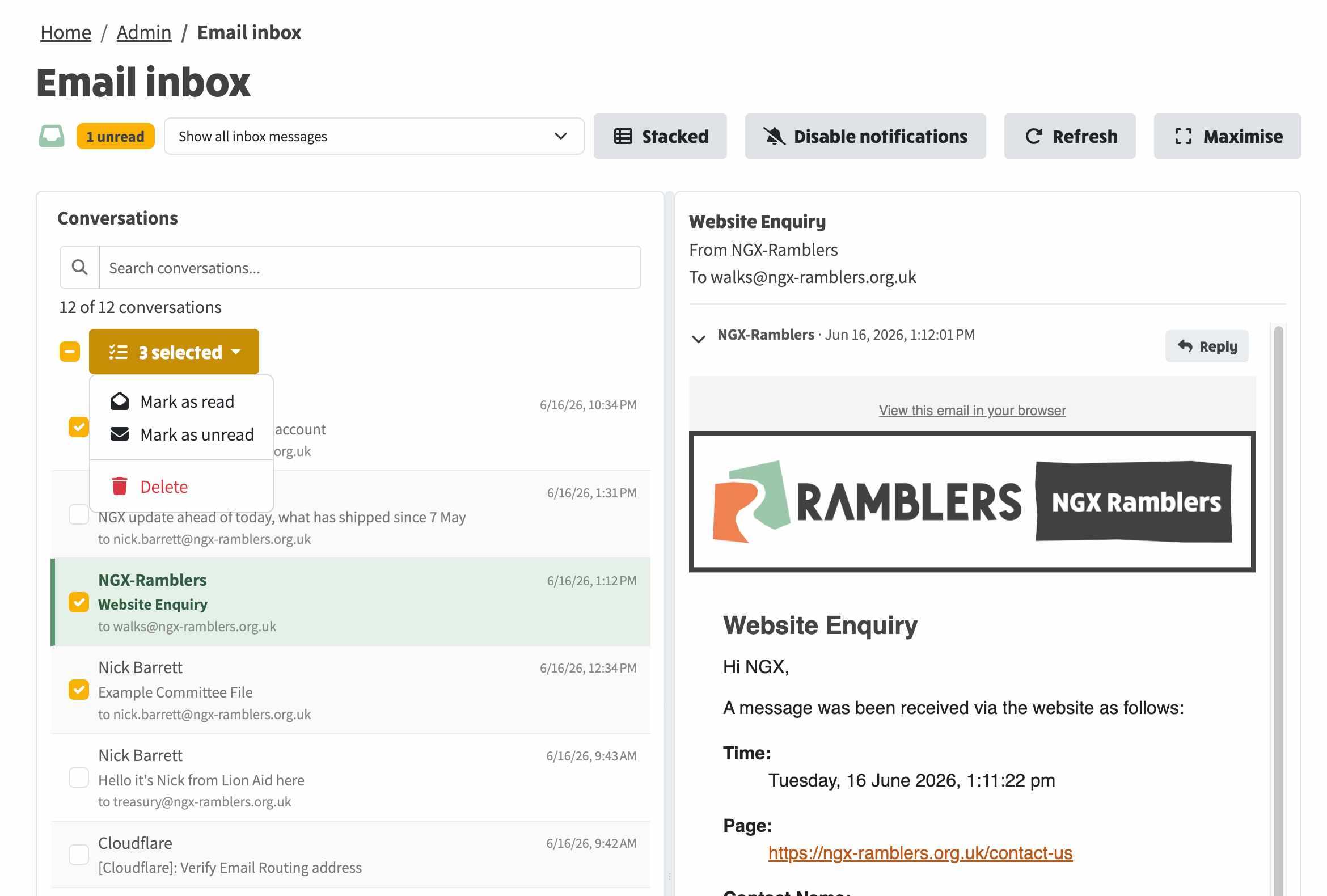
- You can now see who each message was addressed to (the committee role
address), not just the sender.
- Subjects keep their original capitalisation.
- A new Junk view lets you triage spam: move it back to the inbox or delete
it, mirrored to the underlying Gmail account.
- Mark conversations read or unread, and act on several at once from a new
bulk-actions menu.
- The unread badge tooltip names which role mailboxes have unread mail.
- Contact Us submissions to a role backed by a connected inbox now arrive
addressed to the role and grouped under it, instead of arriving as the
raw Gmail address.
At a glance
| Area |
Before |
Now |
| Addressing |
Sender name only |
From and To shown, including the role address it came in to |
| Subject |
Lower-cased |
Original capitalisation kept |
| Spam |
Not visible |
Junk view with "Not junk" and Delete, mirrored to Gmail |
| Read state |
Read on open only |
Mark read/unread, in bulk |
| Contact Us to a connected-inbox role |
Delivered to the raw Gmail address |
Delivered to the role's own address, grouped under the role |
Where to find it
- Admin -> Email inbox: addressing, subjects, the Junk view, the
bulk-actions menu, and read/unread.
- The unread badge in the top navigation bar: the tooltip.
- System Settings -> Committee -> a role's Contact Us / Inbound Forwarding:
the routing fix.
How it behaves
- Recipient visibility: each conversation shows From (sender) and To (the
role address it came in to); the list shows a "to role@..." line; every
message shows explicit From and To. Outbound replies are labelled "Sent
from this group" with the sending address shown.
- Subjects: stored with their original case; the lower-cased form is kept
only for grouping replies into one conversation.
- Junk: every poll also scans Gmail's Spam. Junk is kept out of the normal
views and listed under a "Junk mail" option. "Not junk" removes the Spam
label and adds Inbox in Gmail, then files the conversation under the right
role; "Delete" moves it to Gmail Trash. Junk never raises notifications or
counts as unread.
- Read/unread: the toolbar's bulk menu (shown when you tick conversations)
offers Mark as read, Mark as unread, and Delete, with "Not junk" added in
the Junk view. The change is mirrored to Gmail's Unread label and works on
one or many conversations.
- Notification badge: the tooltip names the role addresses with unread mail
and their counts.
- Contact Us routing: when a role's Inbound Forwarding points at a connected
Gmail inbox, Contact Us submissions are delivered to the role's own domain
address (for example social@yourdomain.org.uk), which the forwarding then
delivers to the mailbox, so the message arrives addressed to the role and
groups under it. Previously a role with no explicit Contact Us target fell
back to its forwarding destination and arrived as the raw Gmail address.
Why the Junk view is restricted
The Junk view and its actions are limited to member administrators, because
triaging spam and changing Gmail labels for a shared mailbox is an
administrative task. Committee members continue to see only the role mail
they have access to.
How to try it out
- Open Admin -> Email inbox. Subjects keep their case and each conversation
shows who it was addressed to.
- Tick one or more conversations and use the bulk-actions menu to mark them
read or unread, or delete them.
- Choose "Junk mail" from the view selector to triage spam, then use "Not
junk" or Delete.
- Send a Contact Us to a role backed by a connected inbox and confirm it
arrives addressed to the role's own address and groups under that role.
Technical changes
- Client: inbox.component (recipient and subject display, Junk view,
bulk-actions dropdown with icons, mark read/unread); inbox.service (folder
parameter, moveThreadToInbox, markThreadUnread); inbox.model
(InboxThreadFolder, thread subject and folder, InboxUnreadRole);
inbox-notification.service and the badge (labelled breakdown observable,
ngx-bootstrap tooltip); committee-member (the Contact Us auto-default to
the role address now also runs when Inbound Forwarding changes, not only
on init).
- Server: the inbox-thread model gains subject and folder; message import is
folder-aware and stores the original subject; the Gmail reader gains spam
listing, un-spam (remove SPAM, add INBOX) and trash; the poller scans Spam
each cycle and files junk without notifying; routes add folder filtering,
an administrator-only junk listing, move-to-inbox, mark-unread, and
Gmail-mirrored delete; the Contact Us resolver defaults an unset Contact Us
target to the role address when the role forwards to a connected inbox.
- Migration 20260616000001 backfills the original subject onto existing
threads.
- Requires a server restart; the subject backfill runs on startup. Client
changes hot-reload.