17-Jun-2026 — conversation collapse/reply, sort toggle, and content-aware single send #278
Improves the committee inbox conversation view (collapse/expand like other
email clients, reply or reply-all to a chosen message, sort order, cleaner
summaries and grouping) and makes outbound sends choose between one combined
message and per-recipient sends based on whether the content personalises.
Part of the Gmail inbox work in #278.
What's new
See https://github.com/nbarrett/ngx-ramblers/issues/278
- Conversation messages collapse and expand like Gmail/Outlook: the newest
opens, the rest show a one-line summary (sender, "to ...", a clean
preview) and expand on click.
- Reply or Reply all to a specific message, via square icon buttons; on a
collapsed message the buttons appear on hover so you can reply without
opening it.
- Sort the conversation newest-first (default) or oldest-first with a toggle.
- Maximise the inbox to fill the whole screen, hiding the nav bar, page
chrome and banners; Restore to return. The maximised state is kept in the
URL (maximise query parameter) and carries through to the email composer
when you reply, so the composer opens maximised too; the maximised view
shows the site logo top-left.
- The inbox toolbar is a single row with the site logo left-most, and the
selected view (all / mine / a specific role mailbox / junk) is kept in the
URL, so the chosen mailbox survives reload and can be linked.
- Clicking Reply puts the cursor straight into the message editor so you can
start typing immediately.
- Denser conversation list (sender and date share a line) and a toolbar that
stacks full-width on small screens instead of overflowing the page.
- Copies of the same send are grouped into a single entry showing the
combined recipient list, and an exact duplicate is no longer shown.
- The collapsed preview shows real message text instead of leaking HTML/CSS.
- Sending to several recipients now goes out as one message addressed to all
of them when the content has no personalisation; if the content uses
member merge fields, it is sent per-recipient so each copy is personalised.
At a glance
| Area |
Before |
Now |
| Older messages |
All fully expanded |
Collapsed one-line summaries, click to open |
| Reply |
Only the latest message |
Reply or Reply all to any message; hover to reveal on collapsed |
| Order |
Fixed oldest-first |
Newest-first by default, toggle to oldest-first |
| Same send to many |
One row per recipient copy |
One grouped entry, combined recipients |
| Collapsed preview |
Leaked <style>/CSS |
Clean text |
| Send to several people |
One transactional send each (you were copied N times) |
One combined send when not personalised; per-recipient only when it uses merge fields |
Where to find it
- Admin -> Email inbox: conversation view, grouping, sort, reply/reply-all.
- The email composer: the content-aware single combined send.
How it behaves
- Conversation: newest message expanded, others collapsed to a summary
(sender + "to " + preview); click to toggle. Square Reply and
Reply all icons sit on the message - always shown when expanded, revealed
on hover when collapsed. The header Reply still answers the latest.
- Sort: the conversation lists newest-first by default; a toggle switches to
oldest-first.
- Maximise: a toggle expands the inbox into a panel fixed over the whole
viewport, hiding the nav bar, breadcrumb, title and banners so the
conversation and message panes fill the screen; the button reads Restore
while maximised and the state is stored in the URL so it survives reload
and can be linked. On small screens the toolbar stacks full-width.
- Grouping: copies of one send (same sender and subject within a few
minutes) merge into a single entry with combined To/Cc. Exact duplicates
are removed, and a server guard stops the same message being stored twice.
- Sending: the content is inspected for member merge fields. With none, all
external recipients are sent one combined email (Cc/Bcc applied once); with
merge fields, recipients are sent individually so each is personalised.
Group members are always sent per-recipient.
How to try it out
- Open a multi-message conversation in Admin -> Email inbox. Older messages
are collapsed; hover one to reveal its reply buttons, or open it and use
Reply / Reply all. Flip the sort order with the toggle.
- Send a committee email to several named people with no merge fields and
yourself in Cc. You should receive a single copy, and the inbox shows one
grouped entry listing all recipients.
Technical changes
- Reply all carries a flag through to the composer so the original
recipients are pre-selected: To is the sender and Cc is pre-filled with the
other recipients (minus the sender and own role addresses), rather than
offered as a "Cc these roles" suggestion as a plain reply does. The
composer's Cc and Bcc panels now render whenever they hold recipients, so
the stepper summary and the visible selection can never differ.
- Client inbox.component: collapse/expand state, Reply and Reply all per
message (reply-all augments Cc with the original recipients, minus the
sender and own role addresses), recipient summary, newest/oldest sort
toggle, send-grouping (same sender and subject within five minutes), exact
dedupe by Gmail message id, HTML-stripped preview, square hover-revealed
reply icons and detail-pane padding; the inbox toolbar is a single
non-wrapping row with the maximise/restore toggle inline and the site logo
left-most, and the view selector writes the role local-part to the URL (a
new StoredValue key) and reads it back on init; the compose editor's TipTap
toolbar is sticky while scrolling; the compose editor is focused on reply
hand-off (via a ViewChild setter, so it fires when the editor renders);
denser conversation rows (sender and date on one line) and a toolbar that
stacks full-width below the small breakpoint.
- Maximise is now a reusable app-maximisable-panel component used by both the
inbox and the email composer, replacing the duplicated full-screen shell in
each. It owns the maximised state (StoredValue.MAXIMISE in the URL), renders
the fixed full-viewport overlay with a Restore/Maximise toggle and a 44px
SiteLogoComponent, and projects the host content; maximise carries across
the reply hand-off and the composer's Back to inbox preserves the maximise
(and thread) parameter. The overlay takes its own compositor layer
(translateZ) and forces a reflow plus a resize on entering maximised and
again once web fonts load, so action buttons paint correctly when maximised
on a slow first paint instead of needing a manual refresh. The composer's
action-bar buttons also carry their own sizing so they no longer depend on
Bootstrap's global .btn winning the cascade.
- Server inbox-message-import: an idempotency guard so a message already on a
thread is not stored a second time.
- Server batch-transactional-send: when the content has no member merge
fields, external recipients are sent one combined email (Cc/Bcc once);
otherwise recipients are sent per-recipient. Members remain per-recipient.
- Requires a server restart for the import guard and the send change; the
conversation-view changes hot-reload.
Email composer recipients redesign
The unbranded recipients step is rebuilt around an email-client-style chip
field, and the picker that was spread across five stacked panels becomes one
collapsible frame.
- "Who is this email going to?" is a single collapsible frame (open by
default, and always opened for an unbranded send); collapsed, it summarises
who is chosen by name across To/Cc/Bcc.
- To/Cc/Bcc are chip/token fields: type to add, with type-ahead over saved
addresses, and Cc/Bcc reveal on demand. Each recipient is a removable chip
you can drag between lines, or click to open a small editor to rename it,
switch its field, toggle save-for-reuse, or remove it. The suggestion list
is keyboard-navigable (arrow keys and Enter).
- Group-member tags and recipient chips share one look, matched to the
"Before you can continue" validation summary (peach fill, sunset border,
bold maroon name); the member tag shows a shortened, consistent qualifier
("with Head Office consent" / "without Head Office consent", date forms
kept). A text filter now survives selecting several matching members in a
row instead of clearing after each pick.
- The Sender and Template step shows the banner preview beside its selects in
a column instead of full-width, so it is no longer oversized.
- Clicking the Compose step opens the body editor and focuses it.
- The composer notification alert sits directly under the action bar with
even spacing and a warning icon and title; membership expiry dates in sent
emails use the standard Ramblers date format; and the send progress bar is
green throughout (red only on failure).
Technical changes (recipients)
- New app-recipient-field standalone component holds the To/Cc/Bcc chip
fields, type-ahead, drag-between-fields, the per-chip editor popover and
keyboard navigation; it replaces the five fieldsets in the unbranded flow,
whose now-dead handlers and fields were removed from email-composer.
- The shared app-maximisable-panel gained a [panelControls] projection slot,
so the maximised row is logo-left, injected-controls, Restore-right, and it
shows the site logo whenever maximised regardless of showHeader; the inbox
and composer both feed their toolbars through the slot.
- member-multi-select renders selected tags via an ng-label-tmp (name, muted
qualifier, remove), styles them to match the recipient chips, sets
clearSearchOnAdd to false so a filter survives multi-select, and shortens
the consent qualifiers.
- notification-config-selector lays the email-type and banner selects in a
left column with the banner preview in a right column.
- email-preview shows a warning icon and title on its error alert.
- Server batch-transactional-send formats MEMBER_EXP with the Ramblers
standard DISPLAY_DATE instead of yyyy-MM-dd (needs a server restart).
Email composer in pictures
Maximise and restore
Any maximised admin view now shows the same top row: the site logo on the left, that view's own controls in the middle, and a Restore button on the right. Maximise fills the screen and hides the site navigation and page chrome; Restore returns to the normal layout. The state is kept in the URL, so a maximised view survives a reload and can be linked, and replying from the inbox opens the composer already maximised.

Maximised composer: site logo on the left, the view's own controls in the middle, Restore on the right.

Recipients are chips. Type an address and press Enter; To, Cc and Bcc hold removable tokens, with Cc and Bcc revealed on demand.
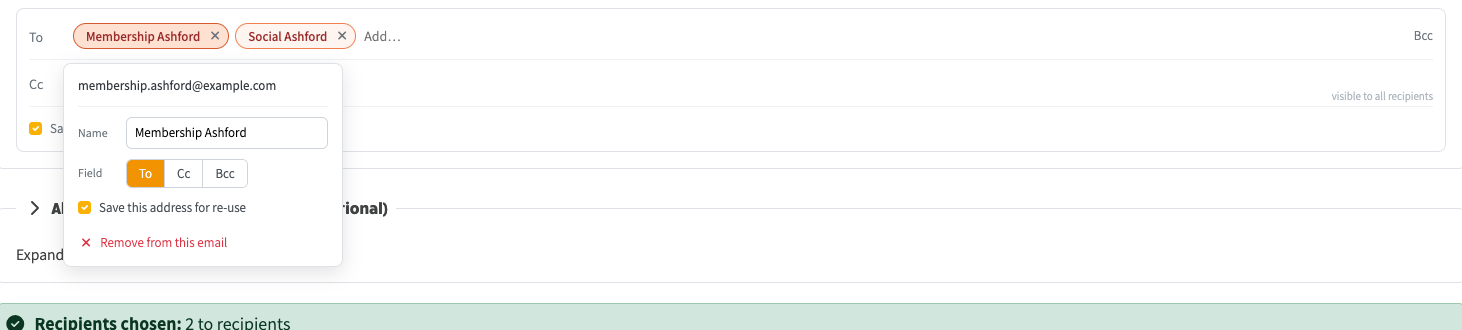
Click a chip to open a small editor: rename the person, switch their field, save the address for re-use, or remove it.

Group members shown as tags with a short consent qualifier. A text filter now survives selecting several matching people in a row.

Sender and Template: the banner preview now sits in a column beside its selects instead of spanning the full width.