28-Jun-2026 — serialise heavy worker jobs ref #300
What's new
- The integration worker now queues heavy jobs so walk uploads and image resize operations do not run at the same time on the same Fly machine. This keeps a resize job from competing with a Ramblers Walks Manager upload for CPU and browser responsiveness.
- The UI has also been updated so users receive clear feedback whenever a job has been queued, and are prevented from accidentally submitting duplicate requests while one is already queued or running.
At a glance
- Walk uploads and image resize jobs now share one worker queue.
- Resize requests are accepted when the worker is busy instead of failing with a 409 "resize job already active" response.
- Queued jobs immediately report their queue position and queued status to the UI.
- Users receive clear visual feedback when their request is waiting to start.
- Duplicate submissions are prevented while a job is queued or running.
- The integration worker remains a single worker; no extra Fly app or separate worker service is introduced.
- The worker Fly configuration keeps the live shared-cpu-2x sizing so future deploys do not revert it to 1x.
Where to find it
Admins continue to use the same places as before:
- Walk uploads: Walks Admin > Export > Upload to Ramblers.
- Image resizing: the existing Image Actions resize controls on content/photo pages.
There is no new admin screen or separate worker to manage.
How it behaves
When the worker is idle, an upload or resize starts immediately. When another heavy job is already running, the new request waits in the shared queue and starts when the active job finishes.
For uploads, the existing upload audit continues to show when the job has been queued and the upload controls remain locked while work is pending. For image resizing, the browser now immediately reports that the job has been queued, displays its queue position, disables further resize actions while the request is queued or running, and warns if another resize is attempted. Busy and queued state is also cleared correctly if a resize fails.
This avoids the previous case where a long-running resize job caused a later resize request to fail with 409 while also slowing an upload that was running at the same time.
How to try it out
- Start a saved-image resize from a content or photo page.
- While it is running, start a walk upload or submit another resize.
- Confirm the second job is queued instead of running concurrently or failing with 409.
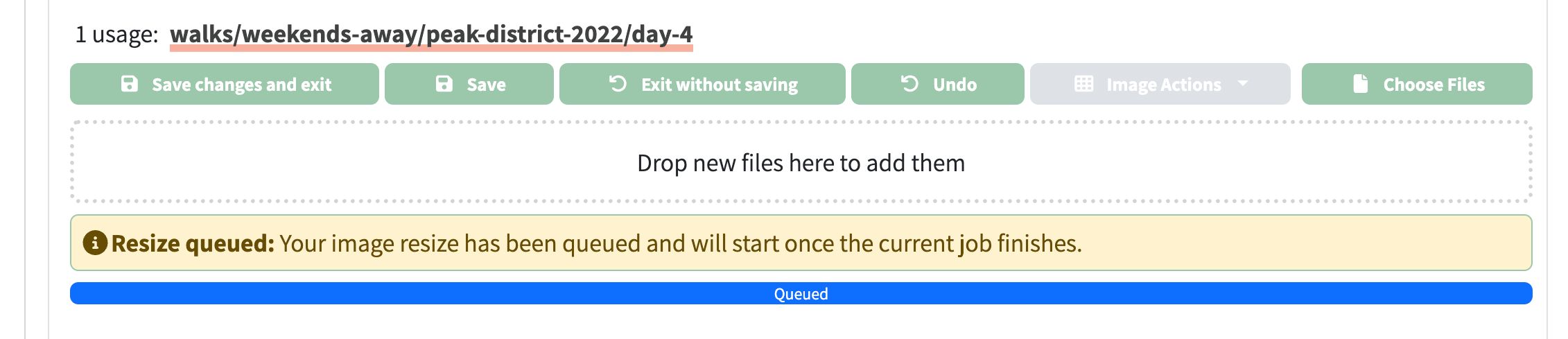
- Confirm the UI immediately indicates that the job is queued and reports its queue position.
- Confirm duplicate resize submissions are prevented while the queued/running job is active.
- Confirm the second job starts after the active job completes.
- Check the upload audit and resize progress messages for the queued-position feedback.

Technical changes
- Added
IntegrationWorkerHeavyJobQueue, a shared in-process FIFO queue for CPU-heavy integration-worker tasks.
- Routed Ramblers upload submissions through the shared queue instead of the upload route's private
activeJobId and queuedJobs state.
- Routed saved and unsaved image resize submissions through the same shared queue and removed the resize route's independent
activeResizeJobId rejection path.
- Added a
queued flag to integration-worker resize responses and WebSocket progress events so the UI can distinguish queued work from active processing.
- Updated the image resize UI to display queued status, disable further resize requests while work is pending, warn on duplicate submissions, and correctly clear busy state after failures.
- Kept the response shape compatible for uploads and extended resize responses with queued metadata.
- Added unit coverage proving upload and resize jobs run one at a time across job types, and that the queue continues after a failed job.
- Updated the Serenity checkbox target description so reports show the composed checkbox name without the parent CSS selector tail.
- Updated
fly.integration-worker.toml to cpus = 2 so the current mitigation survives redeploys.