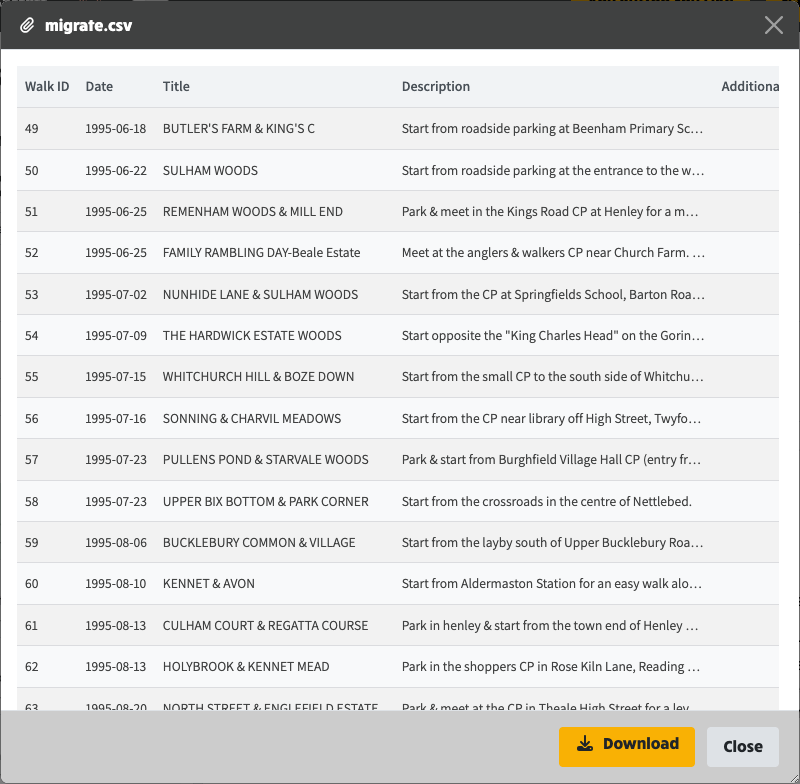
The inbox now handles the files people send you like a proper email client would. When a walker or member replies with a photo, a PDF (a booking form or a risk assessment, say) or a spreadsheet, it arrives as a labelled attachment you can open on the spot. Images, PDFs, CSV files (shown as a table) and plain text all open in a preview window right inside the inbox, so you can read what was sent without downloading it or switching to another program. The preview window can be dragged aside and resized to suit what you are looking at, and when you do download a file it keeps its original name.
You can now send attachments as well. The email composer has an Attachments section, so a committee email can carry files with it. If you attach a type the mail system cannot send, it tells you there and then (and suggests zipping it) rather than letting the send fail later. Pasting an image straight into the editor uploads and drops it in for you, and pasting text offers an "Unwrap on paste" switch that turns hard-wrapped lines back into flowing paragraphs.
The walks pages also got a round of display work: consistent action buttons on walk cards and the edit page, configurable map framing, tidier leader display, and Quick Search that finds a walk by its Walk ID.
Previewing a CSV attachment as a table, straight from the inbox.
EmailAttachment model carried on composer state, drafts, BatchTransactionalSendRequest and SendSmtpEmailRequest; mapped to Brevo's attachment array as absolute URLs; inbox reply writeback records sent attachments so the thread's sent copy shows the same pills.
Attachments upload to a new email-attachments root folder via the existing S3 file-upload endpoint; campaign sends map the first attachment to Brevo's single attachmentUrl.
Attach-time validation against BREVO_SUPPORTED_ATTACHMENT_EXTENSIONS; Brevo 400s anything else, discovered via a GPX file.
TipTap handlePaste intercepts image files, resizes anything over 300KB via FileUtilsService helpers and inserts the uploaded S3 URL at the cursor.
Shared unwrapSoftLineBreaks/hasSoftWrappedParagraph helpers (functions/unwrap-line-breaks.ts) accumulate soft-wrapped and continuation lines while preserving standalone blocks and code fences; the editor exposes unwrapIfEnabled and the composer applies it when consuming a pasted title/forwarded body so the toggle covers that path too.
First use of @angular/cdk drag-drop for the preview dialog, with a native CSS resize grip and a mousedown-based backdrop close so resize drags cannot dismiss it.
CSV preview parses with csv-parse (already a dependency) capped at 200 rows with a truncation note, falling back to text on parse failure.
UiActionsService is the single route query-param API: queryParameter(), updateQueryParameter(s)() with merge and replaceUrl semantics, plus kebab-case value alias helpers; keys always come from StoredValue (31 entries added with values matching the previous literals, so no existing URLs change).
SectionToggle and ContentBlockEditor queryParamKey inputs typed StoredValue, making raw string keys a compile error.
Member login audit sorts via ?sort=login-time&sort-order=descending with a two-way alias map at the URL boundary; Gmail OAuth callback and campaign deep-link keys keep their server-written names; around ten components with entangled queryParams subscriptions were converted keys-only and noted as follow-up.
MapEditComponent gains an initialZoomOffset input and a mapZoomOutLevels walks-config setting (default 2), clamped to the map's real max zoom so OS Leisure tiles zoom out correctly; it emits zoomOutLevelsChange so the config preview reflects manual zooming.
Card and walk-edit action buttons become real buttons/dropdowns in the shared pager-btn style with FontAwesome icons, replacing input[type=submit].
hasVisibleLeaderContactDetails on WalkDisplayService controls whether the leader heading and card row show; quick-search adds fields.migratedFromId; the History tab's synced-version block keys off the walk's own inputSource rather than the group population mode.
AGENTS.md records the commit conventions this session established: compound types and scopes joined with +, the (ref #NNN) subject suffix, the What's new / At a glance / Technical changes body structure the release-notes generator reads, and the rule that commit messages and GitHub issues never name external contacts.