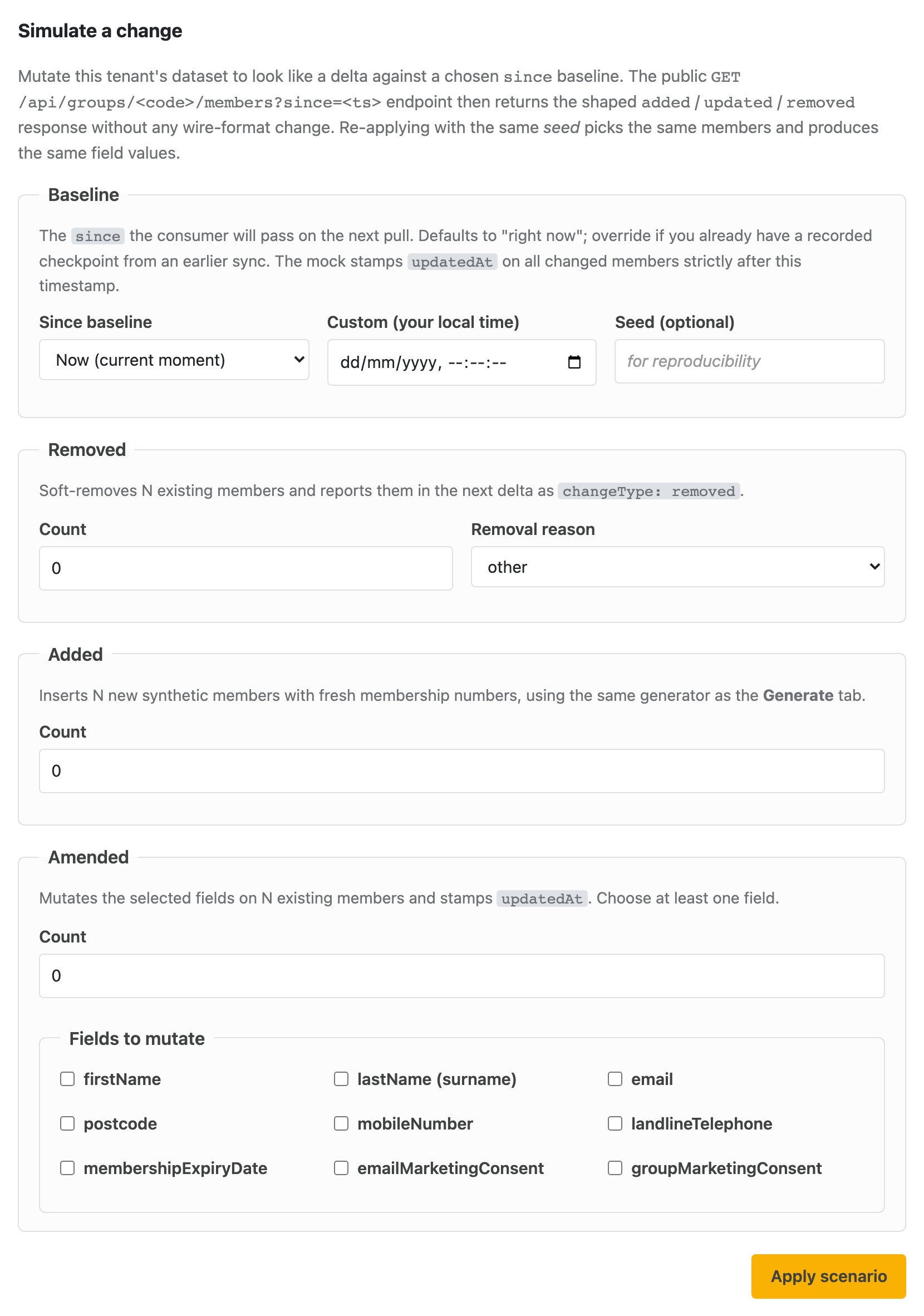
Once a tenant has data, the next thing an end-to-end test usually needs is change: a member who left, a couple who joined, a handful whose details were edited. The Scenarios tab manufactures exactly that. It mutates the tenant's current dataset so that a follow-up GET /api/groups/{code}/members?since=<baseline> call returns a shaped added / updated / removed delta, with no hand-editing of Mongo and no wire-format change. Any conforming consumer reads the result through the ordinary public endpoint.
Incremental sync (covered in Calling the API) hangs off a since timestamp: the consumer remembers when it last pulled and asks for everything changed after that. A scenario works backwards from the same idea:
since, and ask for N removed, M added, K amended.updatedAt strictly after the baseline (added members also get ingestedAt after it).?since=<baseline> and gets back precisely the delta you asked for, split into added / updated / removed.Because each apply records the timestamp it produced (nextSince), you can chain runs: the nextSince of one scenario becomes the since of the next, so each consumer pull sees exactly the changes between two checkpoints.
Open a tenant in /admin and pick the Scenarios tab. There are two panels: Simulate a change (the form) and Recent scenarios (the last 20 applies on this tenant).
The Scenarios tab's "Simulate a change" form: set a since baseline (and an optional seed), then choose how many members to remove, add or amend, plus which fields each amendment should touch. Apply, and the next ?since= pull returns exactly that delta.
| Field | What it does |
|---|---|
| Since baseline | The since your consumer will pass on its next pull. Defaults to Now; switch to Custom date/time if you already have a recorded checkpoint from an earlier sync. Every changed member is stamped updatedAt strictly after this moment. |
| Seed (optional) | Makes the run reproducible. The same seed against the same dataset picks the same members and produces the same field values. Leave blank for fresh randomness on each run. |
Soft-removes N existing members: their removed flag is set (they are not hard-deleted), and they appear in the next delta as changeType: removed. You can tag them with a removal reason (other is the default, plus expired, transferred, and deceased), carried through as removalReason so a consumer can tell why someone dropped off.
Inserts N brand-new synthetic members with fresh membership numbers, using the same generator as the Generate tab, so their consent and role values follow the generator's defaults. They surface in the next delta as changeType: added.
Edits N existing members and stamps updatedAt, so they come back as changeType: updated. You must tick at least one field to mutate. This is where the detail matters, because "amend" does not behave the same way for every field:
| Field(s) | How the amend behaves |
|---|---|
firstName, lastName, email, postcode, mobileNumber, landlineTelephone, membershipExpiryDate |
Replaced with a freshly generated synthetic value. The member keeps their membership number and identity; the chosen field just gets a new plausible value. |
emailMarketingConsent, groupMarketingConsent |
Toggled: the existing boolean is flipped. Amending emailMarketingConsent also updates emailPermissionLastUpdated. This is deliberate, because a consent test usually wants the value to change relative to what the consumer last saw, rather than be set to a random one. |
One consequence is worth calling out: amending membershipExpiryDate sets a future date (one to three years out, exactly like the generator). It is good for testing that a changed expiry propagates through ?since=, but it does not turn a member into a lapsed one. See the note on lapsed members at the end of this page.
The order is fixed: remove first, then amend from what remains, then add. All three draw from the tenant's currently-active (non-removed) members, shuffled deterministically by the seed. If you ask for more than the dataset can supply (say 50 removals on a 30-member tenant), the mock applies as many as it can and returns a warning rather than failing.
The apply returns a JSON summary, also shown inline in the UI:
counts — both what you requested and what was actually applied. These differ when a warning has fired.changes[] — one entry per affected member: membershipNumber, salesforceId, changeType, and for amendments the list of fields that were touched.nextSince — the timestamp this apply produced. Hand it to your consumer as the since for the next pull, or use the Recent scenarios panel's Use as since button to chain straight into another apply.seed — the seed that was used (the one you supplied, or the random one the mock chose), so the run can be reproduced.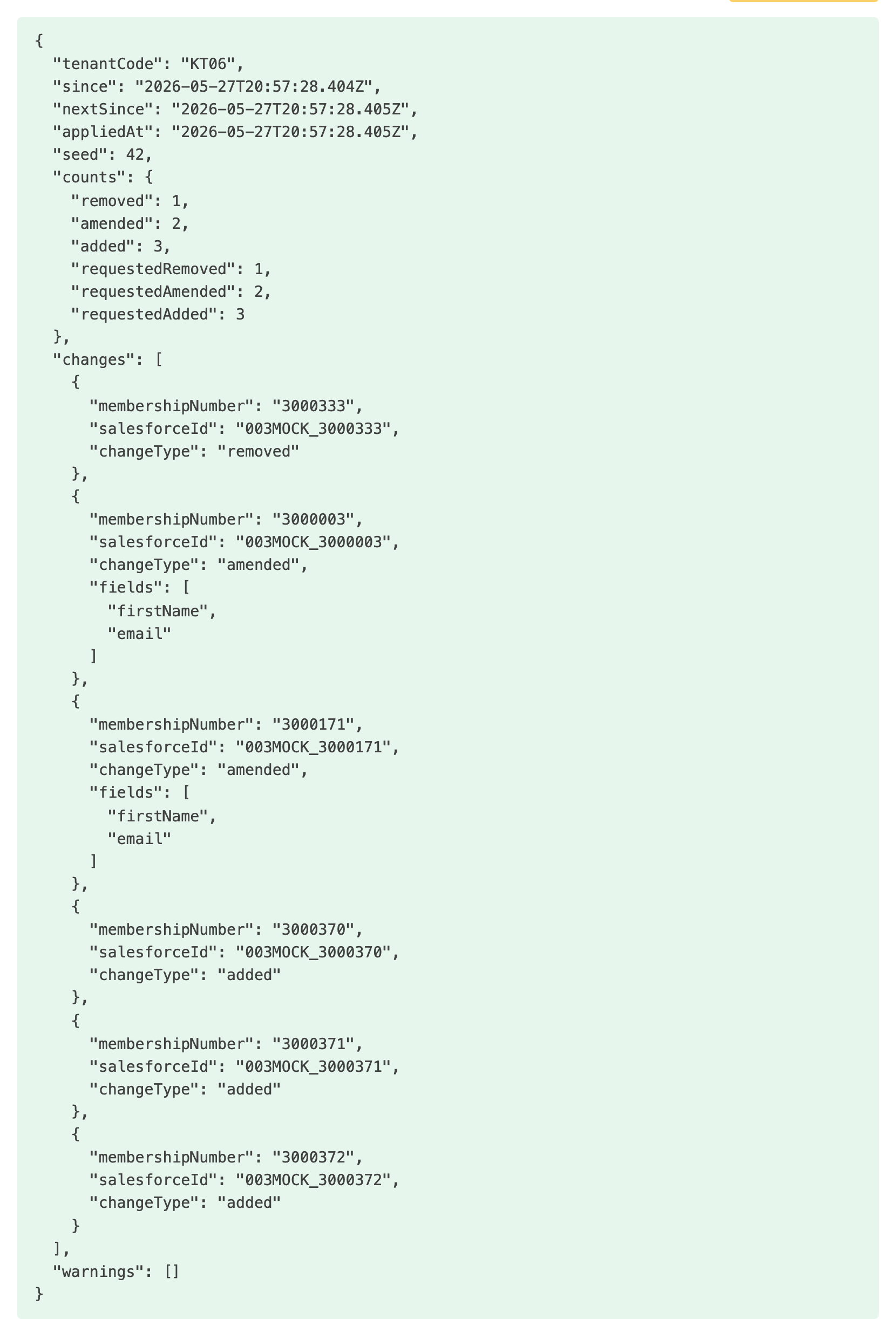
A scenario apply returns (and shows inline) a JSON summary: requested vs applied counts, a per-member changes array listing the fields touched on each amendment, the nextSince to feed the next pull, and the seed used. This run was remove 1, amend 2 (firstName + email), add 3, with no warnings.
Every apply is saved against the tenant. The Recent scenarios panel lists the latest 20 with who ran them, the seed, the removed / amended / added counts, and the nextSince. Use as since copies a row's nextSince into the baseline above, which is the quickest way to walk a consumer through several checkpoints in sequence.
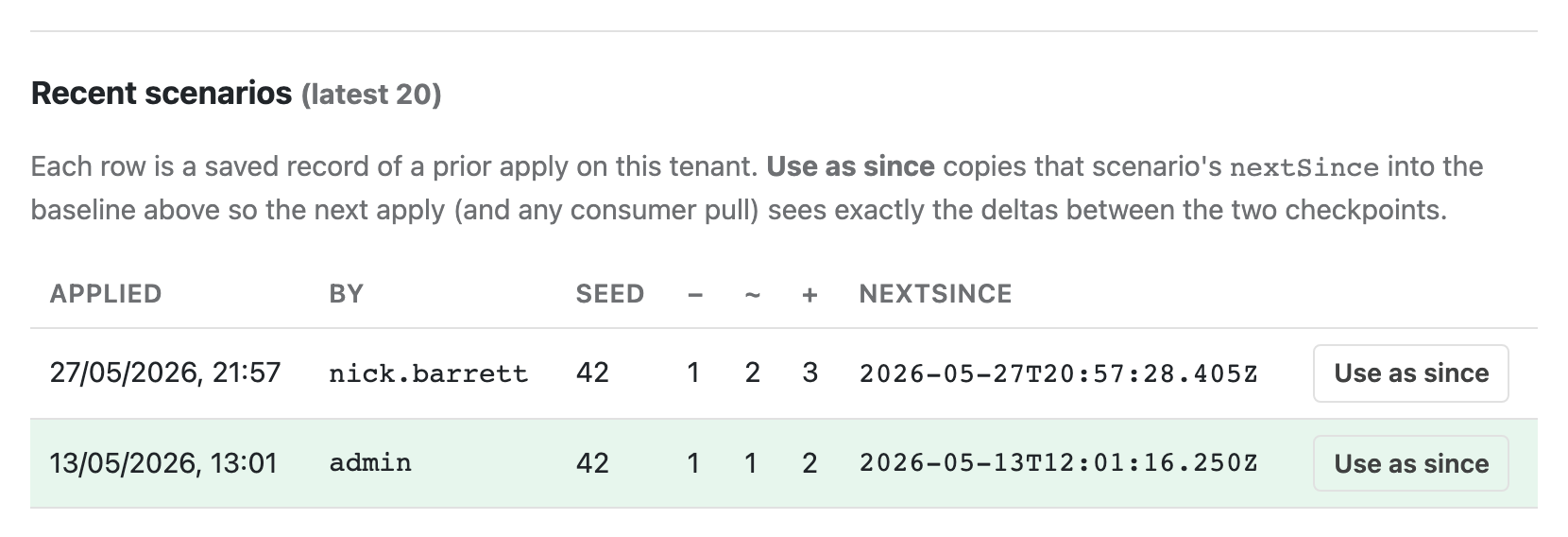
The Recent scenarios panel: each prior apply on this tenant with its seed and removed / amended / added counts. Use as since copies that row's nextSince into the baseline above, so the next apply (and the consumer's next pull) sees exactly the deltas between the two checkpoints.
The form posts to a per-tenant admin endpoint. It authenticates with your operator session cookie, not a Bearer token (Bearer tokens are for the public member API, not the admin surface):
# Apply: remove 2 (reason transferred), add 5, amend 3 (firstName + email), reproducibly
curl -sS -X POST \
  -H "Cookie: <your admin session cookie>" \
  -H "Content-Type: application/json" \
  -d '{
        "since": "2026-05-01T00:00:00Z",
        "removed": 2,
        "added": 5,
        "amended": 3,
        "amendFields": ["firstName", "email"],
        "removalReason": "transferred",
        "seed": 42
      }' \
  https://salesforce-mock.ngx-ramblers.org.uk/admin/api/tenants/KT50/scenarios/delta | jq .

# Then read the delta back through the ordinary public endpoint:
curl -sS \
  -H "Authorization: Bearer $TOKEN" \
  "https://salesforce-mock.ngx-ramblers.org.uk/api/groups/KT50/members?since=2026-05-01T00:00:00Z" | jq .changes
Request fields: since (ISO-8601, defaults to now), removed / added / amended (0 to 10,000, default 0), amendFields (required when amended > 0, at least one of the allow-list), removalReason (expired / transferred / deceased / other), and seed (optional integer). The amend allow-list is firstName, lastName, email, postcode, mobileNumber, landlineTelephone, membershipExpiryDate, emailMarketingConsent, groupMarketingConsent. Earlier applies on a tenant can be listed with GET /admin/api/tenants/{code}/scenarios?limit=20.
A natural question is "how do I get a tenant with some lapsed members, to test ?includeExpired=true?" The answer is that scenarios cannot manufacture those, and neither can the generator. Both the Generate tab and the scenario membershipExpiryDate amend always set an expiry one to three years in the future, so every synthetic member is active. The scenario tool's expired removal reason is a different thing again: it soft-removes the member, so they leave the list entirely and show up as removed in the delta, rather than staying present with a past expiry date.
The only way to get members that are present but lapsed is to upload a real Insight Hub ExportAll.xlsx that already contains past expiry dates. So if you need to exercise the lapsed-member path, keep a real export with lapsed rows in it; if you want a clean, all-active dataset, regenerate from the Generate tab.