The root operator is the only account that can provision other operators. Everything else (creating tenants, generating tokens, loading data, calling the API) is identical to a normal operator account — root simply has the additional ability to add and list operators.
If you're not the root operator, you can skip this page.
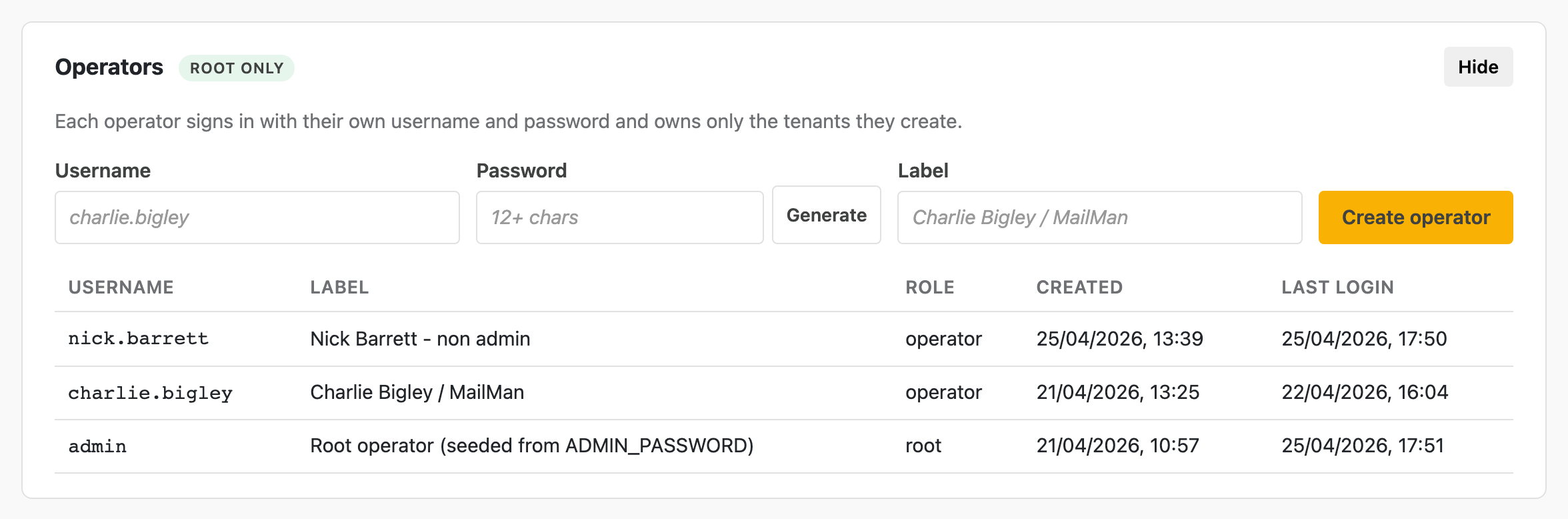
The root-only Operators panel — create a new operator with username, password (or hit Generate for a strong random one), and label. The table below lists all existing operators with their roles and last-login times.
Sign in as root and a panel labelled Operators appears at the top of the dashboard, marked with a root only chip. It is collapsed by default — hit Show to expand.
Inside:
root or operator), created timestamp, last logincharlie.bigley or firstname.surname.Charlie Bigley / MailMan).The reveal panel is the only point at which the password is visible in plaintext to anyone — including you. The server stores only a bcrypt hash, so if the new operator loses the password before they sign in, the only recovery path is to provision a new operator (or, in extremis, redeploy with a new ADMIN_PASSWORD to rotate the root password).
The table below the form shows everyone, in reverse-chronological order of creation. The root operator appears with role root; everyone else is operator. Last-login timestamps make it easy to spot accounts that were provisioned but never used.
There is no UI for revoking, suspending, or deleting an operator at the moment — if that's needed, raise an issue or do it directly against MongoDB.
The same operations are available over the admin API for scripting. Both require an authenticated root session (cookie from /admin/api/login).
# 1. Sign in as root, save the session cookie
curl -sS -c /tmp/rsm.jar \
  -H 'Content-Type: application/json' \
  -d '{"username":"admin","password":"YOUR-ROOT-PASSWORD"}' \
  https://salesforce-mock.ngx-ramblers.org.uk/admin/api/login

# 2. Create an operator
curl -sS -b /tmp/rsm.jar \
  -H 'Content-Type: application/json' \
  -d '{
    "username": "charlie.bigley",
    "password": "a-strong-one-12-chars-or-more",
    "label": "Charlie Bigley / MailMan"
  }' \
  https://salesforce-mock.ngx-ramblers.org.uk/admin/api/operators

# 3. List operators
curl -sS -b /tmp/rsm.jar \
  https://salesforce-mock.ngx-ramblers.org.uk/admin/api/operators

rm /tmp/rsm.jar
When the mock is deployed to a brand-new MongoDB, no operators exist. The deploy reads two environment variables to seed:
| Variable | Used for |
|---|---|
ADMIN_USERNAME |
The root operator's username (default admin) |
ADMIN_PASSWORD |
The root operator's initial password |
BOOTSTRAP_TOKEN |
A long random string. If set, enables the Bootstrap token sign-in tab, which signs you in as the root operator without needing the password. |
If you set ADMIN_PASSWORD and later change it on the running deploy, the next process restart re-hashes and updates the stored hash. That's how root password rotation works — there's no in-app rotation flow.
Once the bootstrap is done and at least one real operator exists, unset BOOTSTRAP_TOKEN from the deployment so the bootstrap tab can no longer be used.