
Your site includes a lightweight booking system that lets visitors book places on events directly from the events page.
Visitors can also cancel their own booking by entering their email address.
Go to Admin then Bookings then Summary to see all bookings across your events.
The Per-Event Detail tab shows the attendees for a single event, lets you download them as a spreadsheet, and lets you send the confirmation emails to everyone booked. Progress and the result appear beside the Send confirmation emails now button.
Sending confirmation emails to everyone booked, from the Per-Event Detail tab
The booking system sends five emails automatically:
Your group's standard wording for these is set once, under Admin > Mail Settings > Email Configurations > Booking Notification. Each email is edited there as a content block: keep the standard wording or write your own, inserting booking fields like the attendee's name, event title and date from the merge-field menu.
Any of the five emails can also be tailored for a single event, without affecting any other. In Admin > Bookings, open the Per-Event Detail tab, pick the event, and use Per-event email overrides: each email offers Standard wording (your group's global wording) or Customise for this event only.
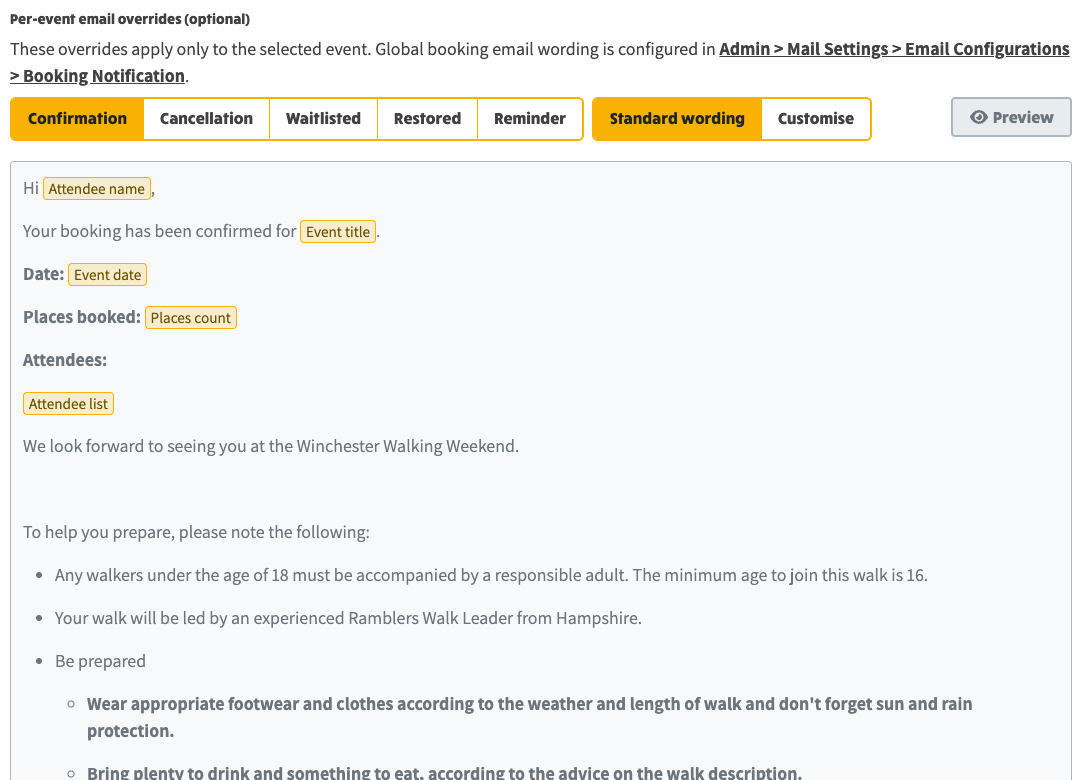
Per-event email overrides on the Per-Event Detail tab, with Standard wording showing the group's global booking wording
The full step-by-step guide to booking email wording, including screenshots of the editor, is Customising Email Wording.